
Decompose a Spherical Polyhedron
Loading the math board and drawing, please wait…
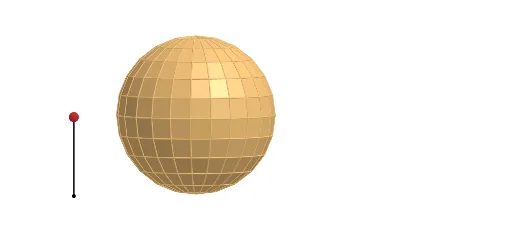
This example demonstrates how to decompose a spherical polyhedron into multiple geometric elements. Key mathematical concepts include spherical geometry, similar triangles, and properties of circles. Using GeoGebra commands such as Line, Rotate, and Segment, one can construct a spherical polyhedron. Suitable for high school geometry courses.
GeoGebra Commands & Parameters
Line((0, 0, 1), (0, 1, 1)) → cSequence(Rotate[(0, 0, 0), ((-((i * 15))))°, c], i, 0, 6) → list1Rotate(list1, 15°, zAxis) → list1'Line(Element[list1, 2], Element[list1', 2]) → l1Line((0, 0, 0), l1) → l0Sequence(Polygon[Element[list1, i], Element[list1', i], Element[list1', i + 1], Element[list1, i + 1]], i, 1, 6) → list2Segment(A, A + (0, 0, 1)) → aPoint(a) → PIf(z(P) ≥ 0.5, 0, (2 * (0.5 - z(P)))) → tIf(z(P) ≥ 0.5, (2 * (1 - z(P))), 1) → sTranslate(list2, Vector[(s * Vector[(0, 0, 0), (1, 0, 0)])]) → list2'Translate(l0, Vector[(s * Vector[(0, 0, 0), (1, 0, 0)])]) → l0'Sphere((0, 0, 1), 1) → bSequence(Pyramid[Element[list2, i], (0, 0, 1)], i, 1, 6) → list3Translate(list3, Vector[(s * Vector[(0, 0, 0), (1, 0, 0)])]) → list3'Line(Element[list1, 3], Element[list1', 3]) → l2Line(Element[list1, 4], Element[list1', 4]) → l3Line(Element[list1, 5], Element[list1', 5]) → l4Line(Element[list1, 6], Element[list1', 6]) → l5Line(Element[list1, 7], Element[list1', 7]) → l6Rotate(Element[list3', 1], ((t * 7.5))°, l0') → dTranslate(l1, Vector[(s * Vector[(0, 0, 0), (1, 0, 0)])]) → l1'Translate(l2, Vector[(s * Vector[(0, 0, 0), (1, 0, 0)])]) → l2'Translate(l3, Vector[(s * Vector[(0, 0, 0), (1, 0, 0)])]) → l3'Translate(l4, Vector[(s * Vector[(0, 0, 0), (1, 0, 0)])]) → l4'Rotate(l1', (7.5° * t), l0') → l1''Rotate(Rotate[Element[list3', 2], ((t * 7.5))°, l0'], ((t * 15))°, l1'') → eRotate(Rotate[l2', ((t * 7.5))°, l0'], ((t * 15))°, l1'') → l2''Rotate(Rotate[Rotate[Element[list3', 3], ((t * 7.5))°, l0'], ((t * 15))°, l1''], ((t * 15))°, l2'') → fRotate(Rotate[Rotate[l3', ((t * 7.5))°, l0'], ((t * 15))°, l1''], ((t * 15))°, l2'') → l3''Rotate(Rotate[Rotate[Rotate[Element[list3', 4], ((t * 7.5))°, l0'], ((t * 15))°, l1''], ((t * 15))°, l2''], (15° * t), l3'') → gRotate(Rotate[Rotate[Rotate[l4', ((t * 7.5))°, l0'], ((t * 15))°, l1''], ((t * 15))°, l2''], ((t * 15))°, l3'') → l4''Rotate(Rotate[Rotate[Rotate[Rotate[Element[list3', 5], ((t * 7.5))°, l0'], ((t * 15))°, l1''], ((t * 15))°, l2''], (15° * t), l3''], (15° * t), l4'') → hTranslate(l5, Vector[(s * Vector[(0, 0, 0), (1, 0, 0)])]) → l5'Rotate(Rotate[Rotate[Rotate[Rotate[l5', ((t * 7.5))°, l0'], ((t * 15))°, l1''], ((t * 15))°, l2''], ((t * 15))°, l3''], (15° * t), l4'') → l5''Rotate(Element[list2', 1], ((t * 7.5))°, l0') → poly1Rotate(Rotate[Rotate[Rotate[Rotate[Rotate[Element[list3', 6], ((t * 7.5))°, l0'], ((t * 15))°, l1''], ((t * 15))°, l2''], (15° * t), l3''], (15° * t), l4''], (15° * t), l5'') → iRotate(Rotate[Element[list2', 2], ((t * 7.5))°, l0'], ((t * 15))°, l1'') → poly2Rotate(Rotate[Rotate[Element[list2', 3], ((t * 7.5))°, l0'], ((t * 15))°, l1''], ((t * 15))°, l2'') → poly3Rotate(Rotate[Rotate[Rotate[Element[list2', 4], ((t * 7.5))°, l0'], ((t * 15))°, l1''], ((t * 15))°, l2''], (15° * t), l3'') → poly4Rotate(Rotate[Rotate[Rotate[Rotate[Element[list2', 5], ((t * 7.5))°, l0'], ((t * 15))°, l1''], ((t * 15))°, l2''], (15° * t), l3''], (15° * t), l4'') → poly5Rotate(Rotate[Rotate[Rotate[Rotate[Rotate[Element[list2', 6], ((t * 7.5))°, l0'], ((t * 15))°, l1''], ((t * 15))°, l2''], (15° * t), l3''], (15° * t), l4''], (15° * t), l5'') → poly6OrthogonalPlane((0, 0, 1), zAxis) → mTranslate(l6, Vector[(s * Vector[(0, 0, 0), (1, 0, 0)])]) → l6'Rotate(Rotate[Rotate[Rotate[Rotate[Rotate[l6', ((t * 7.5))°, l0'], ((t * 15))°, l1''], ((t * 15))°, l2''], ((t * 15))°, l3''], (15° * t), l4''], (15° * t), l5'') → l6''Rotate(Rotate[Rotate[Rotate[Rotate[Rotate[Rotate[m, ((t * 7.5))°, l0'], ((t * 15))°, l1''], ((t * 15))°, l2''], (15° * t), l3''], (15° * t), l4''], (15° * t), l5''], (7.5° * t), l6'') → nMirror(i, n) → i'Mirror(h, n) → h'Mirror(g, n) → g'Mirror(f, n) → f'Mirror(e, n) → e'Mirror(d, n) → d'Mirror(poly6, n) → poly6'Mirror(poly5, n) → poly5'Mirror(poly4, n) → poly4'Mirror(poly3, n) → poly3'Mirror(poly2, n) → poly2'Mirror(poly1, n) → poly1'Sequence(Rotate[list3, 15° + ((15° * 22) * i), zAxis], i, 0, 1) → list4Mirror(list4, m) → list4'Sequence(Rotate[list2, (15° * i), zAxis], i, 1, 23) → list5Mirror(list5, m) → list5'
AI Drawing Prompt Reference
Draw a spherical polyhedron and decompose it into multiple geometric elements. Start by drawing a line from the North Pole to the Equator, then rotate this line around the North Pole six times to form six vertices. Connect these vertices to create a hexagon and use it as a base to construct several pyramids, with their apexes at the center of the sphere. Adjust the size of the pyramids based on the height of the center, then rotate and translate these pyramids to evenly distribute them around the sphere. Finally, mirror some of the pyramids to show symmetry.
The prompt above was compiled from the original drawing commands and is for reference only.