
Dandelin's Theorem: 3D GeoGebra Illustration of Conic Sections and Focal Spheres
Loading the math board and drawing, please wait…
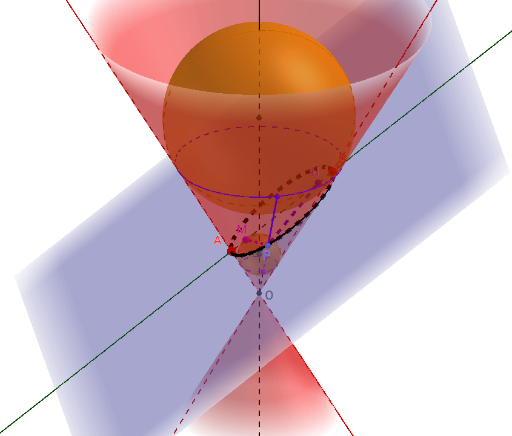
This GeoGebra example provides a dynamic 3D illustration of Dandelin's theorem, demonstrating how a plane cutting a cone produces conic sections (ellipse, parabola, or hyperbola) with their foci and directrices. The core mathematical concepts include conic sections, foci, directrices, Dandelin spheres (inscribed spheres tangent to both the cone and the cutting plane), tangent planes, and angle bisectors. The construction uses commands such as InfiniteCone to create the cone, Plane for the cutting plane, Sphere for the Dandelin spheres, IntersectPath to obtain the conic curve, and AngularBisector, Center, Vector, Angle, Point, Ray, Line, and Segment to build auxiliary elements and mark focal points and tangency relations. Suitable for high school or university courses in analytic geometry and solid geometry, this example helps students understand the unified definition of conic sections and the geometric proof behind Dandelin's theorem.
GeoGebra Commands & Parameters
InfiniteCone((0, 0, 0), zAxis, α) → aAxes(a) → d, e, fRotate(f, (-α), yAxis) → f'_1Point(f'_1) → ARotate(f, α, yAxis) → f'Point(f') → BPlane(A, B_1, B) → bIntersectPath(b, a) → cAxes(c) → i, jAngularBisector(f', i) → b2, b1Center(a) → OVector(O, B) → vOBAngle(Vector[A, B], Vector[A, O]) → βVector(O, A) → vOARotate(vOA, β / 2, A, k) → vOA'Angle(Vector[B, A], Vector[O, B]) → α1Rotate(vOB, α1 / 2, B, k) → vOB'Ray(B, B') → gIntersect(f, b1) → GOrthogonalLine(G, i, k) → hIntersect(i, h) → HCircle(G, H, k) → pSphere(G, H) → lRay(A, A') → mIntersect(f, b2) → LOrthogonalLine(L, i, k) → nIntersect(i, n) → MCircle(L, M, k) → sPoint(c) → PLine(O, P) → a_1Segment(M, P) → b_1Segment(P, H) → e_1Sphere(L, M) → l'OrthogonalLine(L, f'_1, k) → qOrthogonalLine(G, f'_1, k) → rIntersect(f'_1, r) → CIntersect(q, f'_1) → DCircle(f, C) → tCircle(f, D) → c_1Line(O, P) → d_1Intersect(d_1, c_1) → E,Intersect(d_1, t) → F,Segment(P, F) → f_1Segment(E, P) → g_1Segment(O, E) → h_1
AI Drawing Prompt Reference
Create a 3D cone with its apex at the origin and its axis vertical. Cut the cone with an inclined plane to produce a conic section (ellipse, parabola, or hyperbola). Place two spheres inside the cone, each tangent to both the cone's lateral surface and the cutting plane; the tangency points on the plane are the foci of the conic. Through each focus, draw a line perpendicular to the conic's axis, intersecting the sphere's contact circle with the cone, and mark the directrix. Pick a point on the conic, connect it to both foci, and draw perpendiculars to the directrix to illustrate equal distances. Also show the cone's axis, the plane's normal, and relevant angles.
The prompt above was compiled from the original drawing commands and is for reference only.