
Dandelin's Spheres: Conic Section Focus Demonstration
Loading the math board and drawing, please wait…
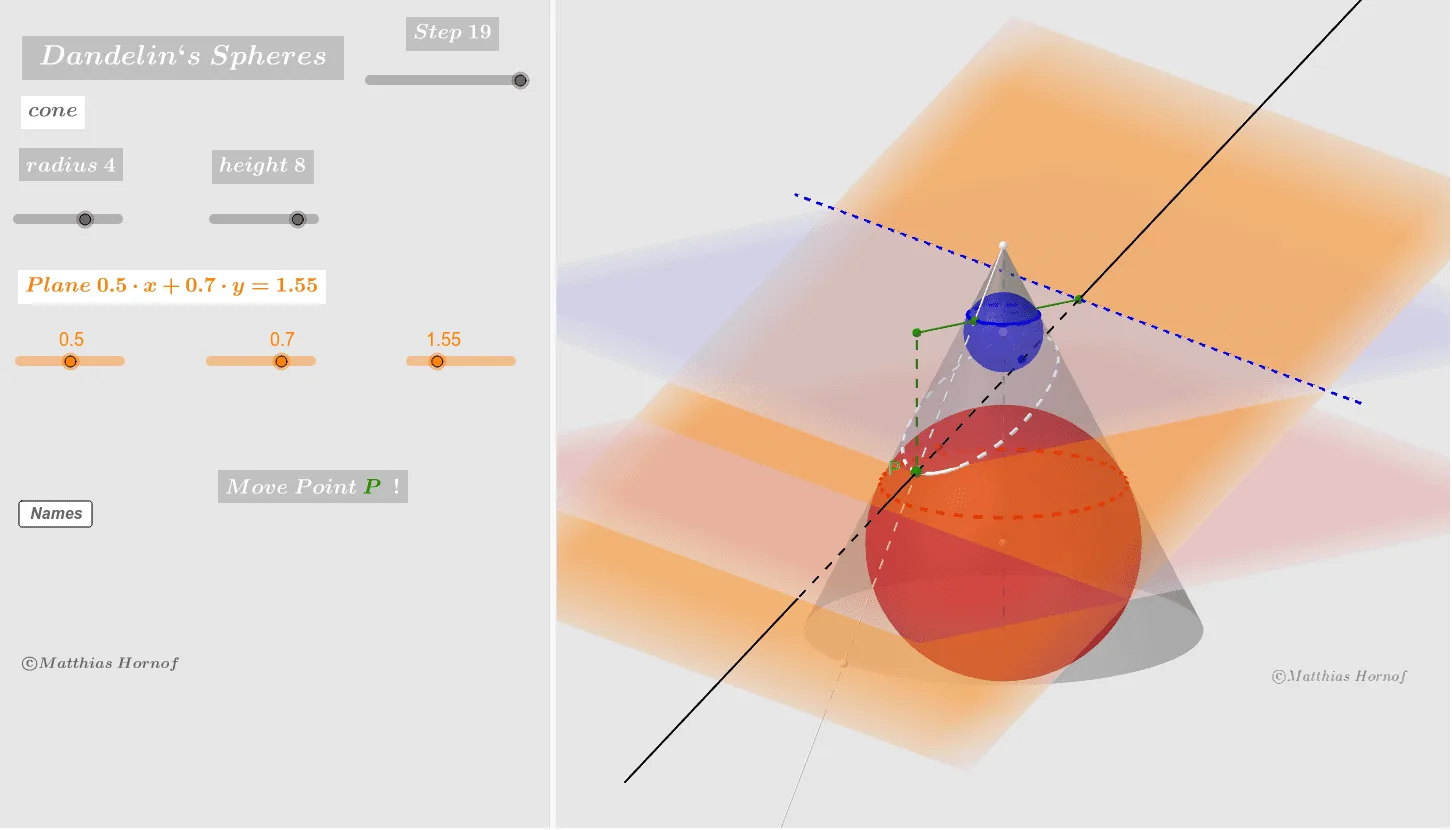
①This GeoGebra example demonstrates the classic Dandelin's spheres construction, showing that when a plane intersects a cone, the resulting conic section (an ellipse) has its foci at the tangency points of two inscribed spheres with the plane.②Core mathematical concepts include conic sections, foci and directrix properties, spatial geometry of tangent spheres, and the intersection path between a plane and a cone.③Construction details: using GeoGebra commands such as Line, Cone, Sphere, IntersectPath, Focus, OrthogonalLine, Segment, Intersect, Point, Ray, and Circle, the model builds a cone, two inscribed spheres, a cutting plane, the intersection curve, the foci, and auxiliary segments/points. Sliders or dynamic points allow adjusting the plane's angle to observe how the ellipse changes.④This is suitable for high school or undergraduate courses in analytic geometry and solid geometry, as well as for mathematical exploration activities, helping students intuitively grasp the geometric essence of conic sections.
GeoGebra Commands & Parameters
Line((0, 0, -3), (0, 0, r_2)) → zgCone((0, 0, -3), (0, 0, r_2), r_1) → kg, c, aIntersectPath(E_0, kg) → dFocus(d) → F_1, F_2OrthogonalLine(F_1, d) → a_1Corner(d) → A, B, C, DSegment((0, 0, -3), (0, 0, r_2)) → zaIntersect(a_1, zg) → C_1Sphere(C_1, F_1) → Dk_1OrthogonalLine(F_2, d) → a_2Intersect(a_2, zg) → C_2Sphere(C_2, F_2) → Dk_2Point(d) → PSegment(C_1, F_1) → cf_1Segment(C_2, F_2) → cf_2Ray(Z, Q) → zqOrthogonalLine(C_2, zq, space) → sc_2Intersect(zq, sc_2) → Bk_2Circle((0, 0, z(Bk_2)), x(Bk_2), space) → kr_2Circle(Bk_{2c}, Bk_{2b}, Bk_2) → e_2OrthogonalLine(C_1, zq, space) → sc_1Intersect(zq, sc_1) → Bk_1Circle(Bk_{1c}, Bk_{1b}, Bk_1) → e_1Intersect(zq, c) → E,Ray(Z, P) → zpIntersect(zp, c) → F,IntersectPath(E_0, E_1) → bOrthogonalLine(P_1, b, space) → eIntersect(b, e) → LLine(L, P) → fSegment(P, P_1) → s_{01}Segment(P_1, L) → s_{02}Segment((0, 0, z(Bk_1)), P_1) → s_{m2}Intersect(s_{m2}, e_1) → P_3,
AI Drawing Prompt Reference
Draw a cone and place two inscribed spheres inside it, with the spheres tangent to the cutting plane. The intersection of the cutting plane with the cone forms an ellipse, whose foci are the points where the spheres are tangent to the plane. First, draw the cone, then draw the two spheres ensuring they are internally tangent to the cone, followed by drawing the cutting plane and marking the foci of the ellipse. Finally, add auxiliary lines and points to illustrate the properties of the ellipse.
The prompt above was compiled from the original drawing commands and is for reference only.