
Da Vinci’s Proof Without Words: Circle and Polygon Correspondences
Loading the math board and drawing, please wait…
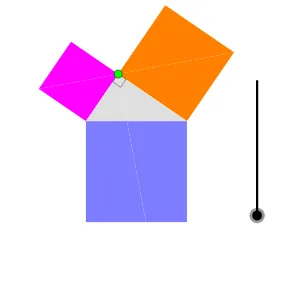
This GeoGebra example presents a “proof without words” style construction in which relationships that would normally require algebraic or formal writing become visible through a carefully arranged diagram. The construction uses circle/semicircle geometry and corresponding polygonal regions to reveal hidden equalities or matched relationships using angle constraints and symmetry-like transformations. Key mathematical ideas include geometric construction, properties of circles and semicircles, angle measurement/equality, and a build-up of points created from midpoints, lines, and intersections. In GeoGebra, the model is built with Point, Semicircle, Polygon, and Midpoint; Line and Intersect determine the critical intersection points; If controls conditional steps in the workflow; Rotate provides rotational correspondence; and Angle is used to define and check the essential angle relations. The resulting polygons (e.g., poly1/poly2/poly3) together with circle-related points form the visual “argument.” Suitable for middle to high school geometry, competitive math practice, and interactive classroom demonstrations of proof visualization.
GeoGebra Commands & Parameters
Point(xAxis) → APoint(xAxis) → BSemicircle(A, B) → cPoint(c) → CPolygon(A, C, 4) → poly1, f, g, h, i, D, EPolygon(C, B, 4) → poly2, j, k, l, m, F, GPolygon(B, A, 4) → poly3, n, p, q, r, H, IPolygon(A, E, C) → t2, c_2, a_1, ePolygon(E, D, C) → t3, c_3, e_1, dPolygon(C, B, F) → t4, f_1, c_4, b_1Polygon(F, G, C) → t5, c_5, f_2, g_1Midpoint(A, I) → JLine(C, J) → sIntersect(q, s) → KIntersect(s, n) → MPolygon(K, H, A, M) → q1, k_1, h_1, a_2, m_1Polygon(K, I, B, M) → q2, k_2, i_1, b_2, m_2Polygon(A, M, C) → t1, c_1, a, m_3Polygon(M, C, B) → t6, b, m_4, c_6If(0 < o ≤ 1, Polygon[Rotate[A, (o * π), J], Rotate[M, (o * π), J], Rotate[C, (o * π), J]], Polygon[Rotate[A, π, J], Rotate[M, π, J], Rotate[C, π, J]]) → t7If(0 < o ≤ 1, Polygon[Rotate[M, (o * π), J], Rotate[C, (o * π), J], Rotate[B, (o * π), J]], Polygon[Rotate[M, π, J], Rotate[C, π, J], Rotate[B, π, J]]) → t8If(2 < o ≤ 3, Segment[Dilate[C, 3 - o, E], Dilate[C, 3 - o, F]], Segment[E, F]) → tRotate(C, π, J) → C'If(4 < o ≤ 5, Segment[Dilate[C, 5 - o, C'], C], Segment[C', C]) → j_1If(8 < o ≤ 9, Polygon[Rotate[A, ((8 - o) * π / 2), A], Rotate[M, ((8 - o) * π / 2), A], Rotate[C, ((8 - o) * π / 2), A]], Polygon[Rotate[A, ((-π)) / 2, A], Rotate[M, ((-π)) / 2, A], Rotate[C, ((-π)) / 2, A]]) → t11If(8 < o ≤ 9, Polygon[Rotate[C, ((8 - o) * π / 2), A], Rotate[B, ((8 - o) * π / 2), A], Rotate[F, ((8 - o) * π / 2), A]], Polygon[Rotate[C, ((-π)) / 2, A], Rotate[B, ((-π)) / 2, A], Rotate[F, ((-π)) / 2, A]]) → t9If(8 < o ≤ 9, Polygon[Rotate[M, ((8 - o) * π / 2), A], Rotate[C, ((8 - o) * π / 2), A], Rotate[B, ((8 - o) * π / 2), A]], Polygon[Rotate[M, ((-π)) / 2, A], Rotate[C, ((-π)) / 2, A], Rotate[B, ((-π)) / 2, A]]) → t10If(8 < o ≤ 9, Polygon[Rotate[A, ((8 - o) * π / 2), A], Rotate[E, ((8 - o) * π / 2), A], Rotate[C, ((8 - o) * π / 2), A]], Polygon[Rotate[A, ((-π)) / 2, A], Rotate[E, ((-π)) / 2, A], Rotate[C, ((-π)) / 2, A]]) → t12Angle(A, C, B) → α
AI Drawing Prompt Reference
Place two points A and B on the plane, draw the semicircle with endpoints A and B, and choose a point C on that semicircle. Construct three polygonal regions using the circle/semicircle-related vertices so that the edges define matching angle and correspondence patterns between the A–C, C–B, and B–A parts. Next, build additional key points from midpoints and intersections: take the midpoint J of segment A with an intersection point I, draw the line through C and J, and find its intersections with previously formed segments to obtain points K and M. Form two corresponding quadrilateral polygons using (K, H, A, M) and (K, I, B, M), and also include the central triangle-like polygon (A, M, C) and (M, C, B). Mark the angle at C, specifically ∠ACB = α, and visually relate the polygon parts by applying rotational correspondence about J so the arrangement highlights the matched relationships around α.
The prompt above was compiled from the original drawing commands and is for reference only.