
Cylinder Sections Investigation
Loading the math board and drawing, please wait…
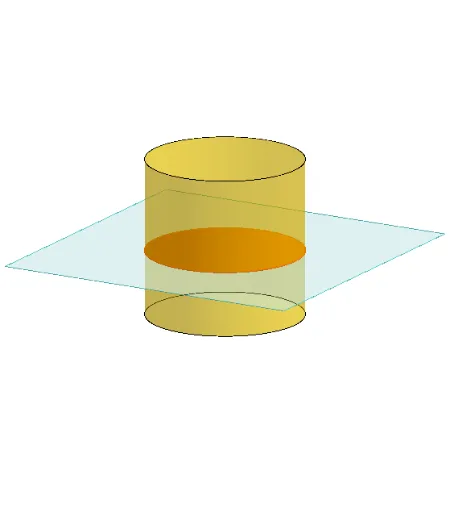
This example demonstrates the various cross-sections formed by a cylinder. Key math concepts include solid geometry, geometric sections, and spatial visualization. It utilizes commands like Polygon, PointIn, Translate, Rotate, Cylinder, Plane, IntersectPath, OrthogonalLine, and Ends. Suitable for high school geometry instruction and spatial reasoning development.
GeoGebra Commands & Parameters
Polygon(B + (-2, -2), B + (2, -2), B + (2, 2), B + (-2, 2)) → poly3, e, f, g, iPointIn(poly3) → CTranslate((0, 0, 0), Vector[B, C]) → APolygon(A + (-4, -4), A + (4, -4), A + (4, 4), A + (-4, 4)) → poly1, a, b, c, dRotate(Rotate[Translate[poly1, Vector[A, A + (0, 0, h)]], (90° * s), A + (0, 0, h), yAxis], (90° * t), A, zAxis) → poly2Rotate(D, 120°, (0, 0, 0)) → EPolygon(D, E, 3, xOyPlane) → poly4, j, k, l, FCylinder((0, 0, 0), (0, 0, 4), 2) → m, e_1, f_1, oPointIn(poly2) → GPointIn(poly2) → HPointIn(poly2) → IPlane(G, I, H) → nIntersectPath(n, m) → poly6OrthogonalLine(A, n) → d_1Ends(m) → g_1, g_1_1
AI Drawing Prompt Reference
Draw a cylinder with a radius of 2 and a height of 4. Then, draw a tilted plane on the cylinder to form an elliptical cross-section. Next, rotate this plane around the cylinder's axis to create a series of parallel elliptical cross-sections. Finally, rotate one of these ellipses by 120 degrees to form a new ellipse.
The prompt above was compiled from the original drawing commands and is for reference only.