
Cylinder Net and Dimension Changes
Loading the math board and drawing, please wait…
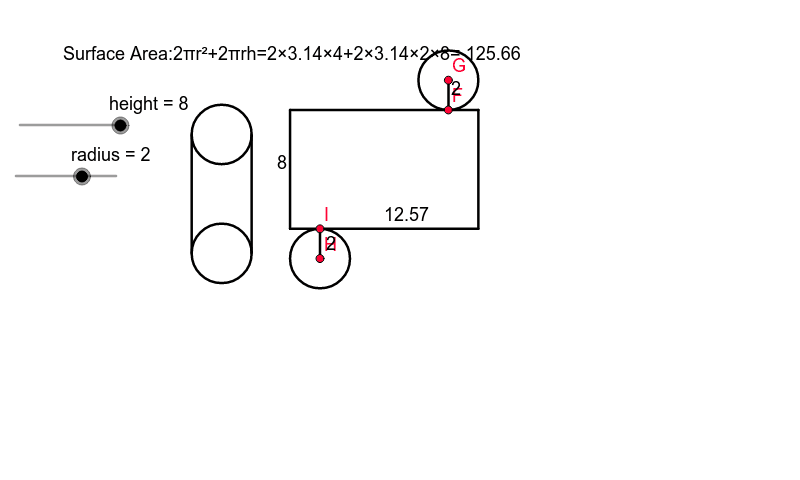
This example demonstrates the surface area and volume changes of a cylinder by adjusting its radius and height. Key mathematical concepts include the geometric properties of a cylinder, area, and volume formulas. It uses GeoGebra commands such as Point, Circle, Segment, Intersect, OrthogonalLine, and Line for construction. Suitable for middle school and above students learning solid geometry.
GeoGebra Commands & Parameters
Point(xAxis) → ACircle(A, radius) → cSegment(B, C) → aCircle(E, radius) → dSegment(C, E) → bSegment(E, D) → eSegment(D, B) → fIntersect(d, b, 1) → FCircle(F, radius) → gOrthogonalLine(F, b) → hIntersect(g, h, 2) → GCircle(G, radius) → kIntersect(c, xAxis, 2) → HCircle(H, radius) → pIntersect(p, f, 1) → IPoint(yAxis) → JCircle(J, radius) → qCircle(K, radius) → rPoint(r) → LPoint(q) → MSegment(L, M) → iLine(K, L) → jLine(J, M) → lIntersect(r, j, 2) → NIntersect(q, l, 2) → OSegment(N, O) → mSegment(I, H) → nSegment(G, F) → t
AI Drawing Prompt Reference
Draw a cylinder net and observe how the surface area and volume change by adjusting its radius and height. Start by drawing a circle as the base, then draw a vertical segment as the height, and finally sketch the side surface of the cylinder. Adjust the radius of the circle and the length of the segment to see the changes.
The prompt above was compiled from the original drawing commands and is for reference only.