
Cylinder - Illusion
Loading the math board and drawing, please wait…
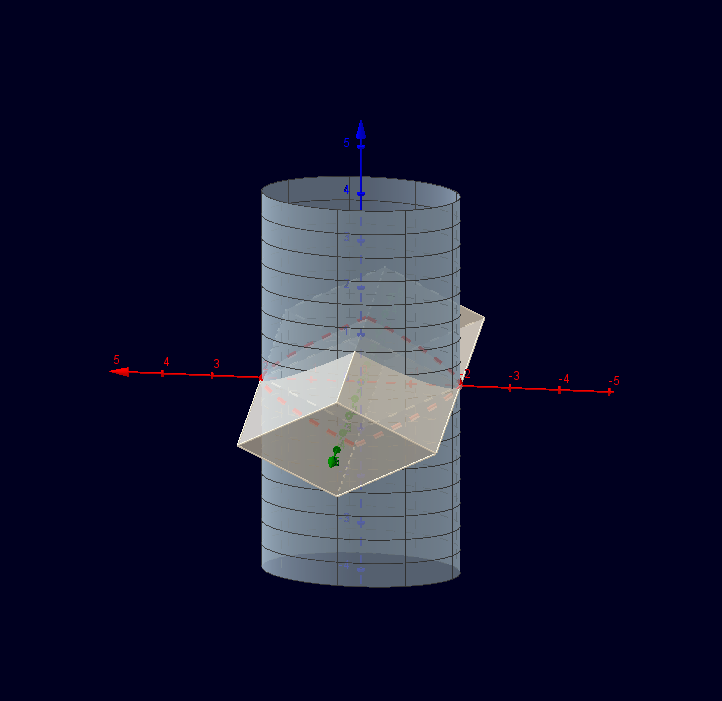
This example demonstrates the geometric construction and visual illusion of a cylinder. Key mathematical concepts include cylinder, circle, and piecewise-defined functions. Using GeoGebra commands such as Surface, Point, Polygon, Line, etc., the various faces and edges of the cylinder can be constructed. Suitable for high school geometry and solid geometry education.
GeoGebra Commands & Parameters
Surface((2 * cos(u)), sin(u), v, u, 0, (2 * π), v, -4, 4) → aPoint(zAxis) → APoint(xAxis) → BPoint(zAxis) → CPoint(xAxis) → DPolygon(B, A, D, C) → Vieleck1, b, a_1, d, cLine(B, yAxis) → fPoint(yAxis) → EOrthogonalPlane(E, yAxis) → eIntersect(f, e) → FMirror(F, B) → F'Prism(Vieleck1, F) → g, G, KanteAG, KanteDH, KanteCI, KanteFG, KanteGH, KanteHI, KanteFI, H, I, FlächeABFG, FlächeADHG, FlächeCDHI, FlächeBCIF, FlächeFGHI, KanteBFPrism(Vieleck1, F') → h, J, KanteAJ, KanteDK, KanteCL, KanteF'J, KanteJK, KanteKL, KanteF'L, K, L, FlächeABF'J, FlächeADKJ, FlächeCDKL, FlächeBCLF', FlächeF'JKL, KanteBF'CurveCartesian((2 * cos(t)), sin(t), 1 - cos(t), t, (-π) / 2, 0) → k_1CurveCartesian((2 * cos(t)), sin(t), -1 + cos(t), t, 0, π / 2) → k_2CurveCartesian((-2 * cos(t)), sin(t), -1 + cos(t), t, 0, π / 2) → k_3CurveCartesian((-2 * cos(t)), sin(t), 1 - cos(t), t, (-π) / 2, 0) → k_4
AI Drawing Prompt Reference
Draw the geometric construction and visual illusion of a cylinder, showcasing the mathematical concepts of cylinder, circle, and piecewise-defined functions. Start by creating a rotating surface, then construct the top and bottom faces and the side surface of the cylinder. Use points on the axis and planes orthogonal to it to form the side surface, and represent the edges with curves to complete the 3D shape.
The prompt above was compiled from the original drawing commands and is for reference only.