
Cylinder Exercises: 3D Geometry and Vector Construction
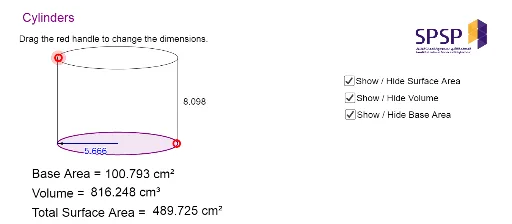
Loading the math board and drawing, please wait…
①This example demonstrates how to construct a cylinder and related geometric objects in GeoGebra using points, lines, ellipses, and vectors in 3D space, accompanied by a series of exercises. ②Core mathematical concepts include properties of cylinders, 3D vectors, translation transformations, elliptical cross-sections, and spatial relationships among points, lines, and planes, with extensions to sequences and series, linear programming, and right triangles. ③Construction highlights: from the summary, commands such as Line, Point, Ellipse, Vector, Translate, Intersect, Segment, PointIn, Midpoint, and Circumference are used, creating objects like A, B, C, D, E, F, G, H, I, J, K, L, M, P, N, O, and text labels, to build the cylinder's bases, lateral surface, and auxiliary lines via translation, intersection, and midpoint operations. ④Suitable for high school or early college students learning solid geometry, vectors, and 3D graphing, and for teachers as an interactive resource to demonstrate cylinder-related properties.
GeoGebra Commands & Parameters
Line(A, B) → aLine(A, C) → bPoint(b) → DEllipse(A, D, E) → cPoint(a) → FVector(A, F) → uTranslate(c, u) → c'Line(F, b) → dIntersect(c', d, 1) → GIntersect(c, b, 1) → HIntersect(c', d, 2) → IIntersect(c, b, 2) → JSegment(H, G) → eSegment(I, J) → fPointIn(c') → Pointc'Intersect(c, e, 1) → KSegment(K, D) → hMidpoint(h) → LPoint(c) → MIntersect(c, e, 1) → PIntersect(c, f, 1) → NSegment(P, N) → iMidpoint(i) → OVector(O, P) → vCircumference(c) → circumferencecPointIn(c) → Pointc_1PointIn(c) → PointcSegment(O, P) → k