
Cylinder Construction by a.schwing
Loading the math board and drawing, please wait…
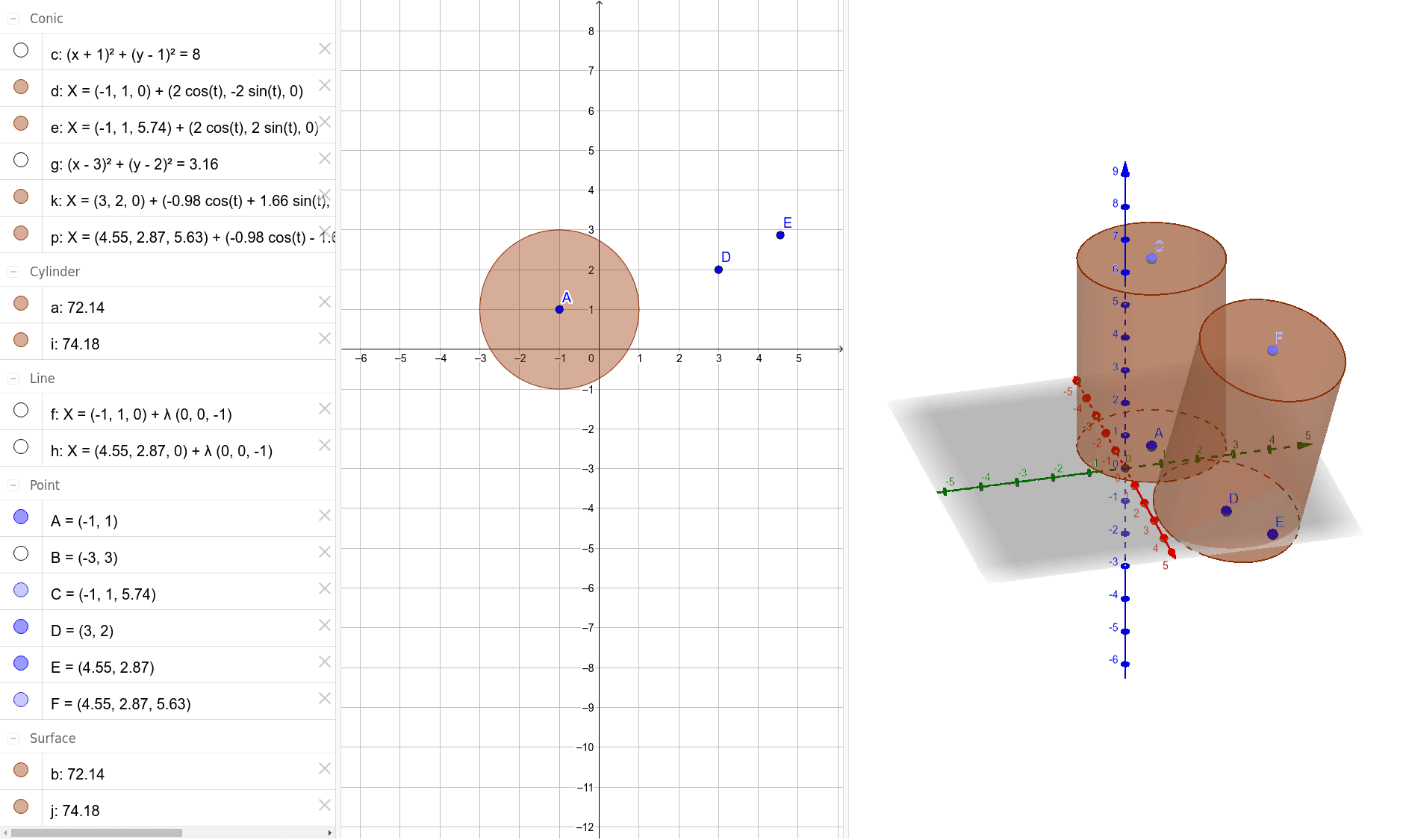
This example demonstrates the 3D geometric construction of a cylinder. Key math concepts include the definition of a cylinder in solid geometry, properties of circles, and the positional relationship between points and lines. Construction highlights involve using GeoGebra commands/objects like Circle, OrthogonalLine, Point, and Cylinder. Suitable for high school students learning solid geometry to visually understand the formation and geometric properties of cylinders.
GeoGebra Commands & Parameters
Circle(A, B) → cOrthogonalLine(A, c) → fPoint(f) → CCylinder(A, C, 2) → a, d, e, bCircle(D, E) → gOrthogonalLine(E, g) → hPoint(h) → FCylinder(D, F, 2) → i, k, p, j
AI Drawing Prompt Reference
Draw a cylinder by first creating a circle and then drawing a perpendicular line from the center to the circle. Take a point on this line and use it along with the center to form the base and top of a cylinder. Next, create another circle, draw a perpendicular line from its center, and take a point on this line to form another cylinder with the same height, demonstrating the construction and geometric properties of cylinders.
The prompt above was compiled from the original drawing commands and is for reference only.