
Cylinder and Cone Volume Calculation by Meera Lawrence
Loading the math board and drawing, please wait…
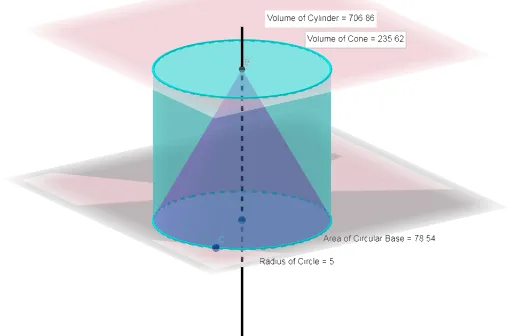
This example demonstrates the calculation and comparison of volumes for a cylinder and a cone. It involves core mathematical concepts such as volume formulas, pi, and geometric properties. Construction highlights include using commands like OrthogonalLine, Intersect, Cylinder, Cone, Area, PointIn, Volume, Point, Distance, and Midpoint, along with objects for geometric construction and calculation. It is suitable for middle school students and above learning solid geometry volume, or for educational demonstrations.
GeoGebra Commands & Parameters
OrthogonalLine(A, b) → fIntersect(f, b) → BCylinder(A, B, r) → c, d, e, gCone(A, B, r) → i, k, jArea(e) → lPointIn(e) → PointeVolume(c) → volumecPointIn(b) → Pointb_1Volume(i) → volumeiPointIn(b) → PointbArea(k) → mPointIn(k) → PointkPoint(k) → CDistance(A, C) → distanceACMidpoint(A, C) →
AI Drawing Prompt Reference
Draw a cylinder and a cone with the same base radius and height. Start by drawing a base circle, then draw a vertical line from the center of the circle to represent the height. Calculate the volume of the cylinder as the base area times the height and the volume of the cone as one-third of the base area times the height. Mark a point on the side of each shape and calculate their respective areas and volumes, then compare the differences in volume.
The prompt above was compiled from the original drawing commands and is for reference only.