
Cygnus Geometry Demo
Loading the math board and drawing, please wait…
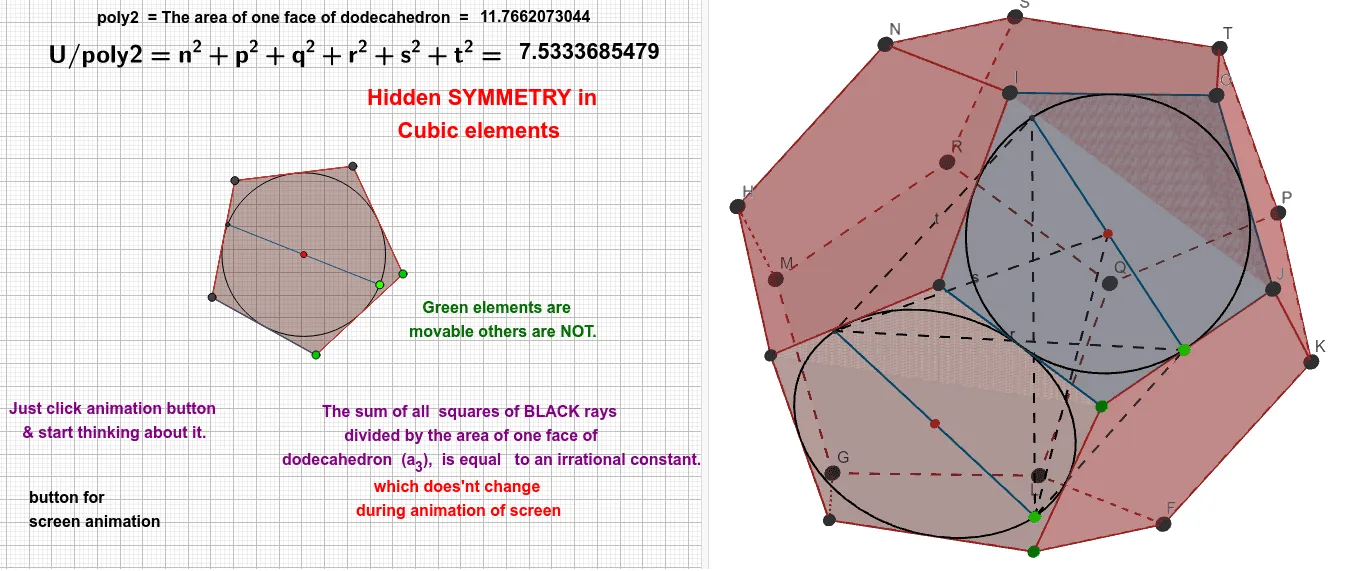
This example demonstrates geometric constructions and properties under the Cygnus theme, involving core concepts like centroid, circle, polygons, symmetry, and geometric transformations. It constructs figures using commands such as Polygon, Dodecahedron, Midpoint, Circle, Point, Centroid, Line, Intersect, and Segment, making it suitable for high school students and math enthusiasts exploring geometric properties.
GeoGebra Commands & Parameters
Polygon(A, B, 5) → poly1, f_2, g_2, h_2, i, j, C, D, EDodecahedron(poly1, true) → a_3, F, O, P, Q, R, S, T, faceAEIOJ, faceABFKJ, faceBCGLF, faceCDHMG, G, faceDEINH, faceINSTO, faceJKPTO, faceFKPQL, faceGLQRM, faceHMRSN, facePQRST, edgeAJ, edgeEI, edgeIO, H, edgeJO, edgeJK, edgeFK, edgeBF, edgeFL, edgeGL, edgeCG, edgeGM, edgeHM, edgeDH, I, edgeHN, edgeIN, edgeNS, edgeST, edgeOT, edgePT, edgeKP, edgePQ, edgeLQ, edgeQR, J, edgeMR, edgeRS, K, L, M, NPolygon(D, E, A, B, C) → poly2, d, e, a, b, cPolygon(I, E, A, J, O) → poly3, ı, e_1, a_2, j_1, oMidpoint(D, E) → UMidpoint(D, C) → VMidpoint(E, A) → WCircle(V, U, W) → kMidpoint(E, I) → ZMidpoint(I, O) → A_1Midpoint(O, J) → B_1Circle(Z, A_1, B_1) → pPoint(p) → C_1Point(k) → D_1Centroid(poly2) → E_1Centroid(poly3) → F_1Line(D_1, E_1) → lLine(C_1, F_1) → mIntersect(m, p, 1) → G_1Intersect(k, l, 2) → H_1Segment(D_1, H_1) → nSegment(C_1, G_1) → qSegment(H_1, C_1) → rSegment(H_1, F_1) → sSegment(H_1, G_1) → tSegment(D_1, C_1) → fSegment(D_1, F_1) → gSegment(D_1, G_1) → h
AI Drawing Prompt Reference
Draw a regular pentagon as the base, then construct a regular dodecahedron on it, keeping its edges and faces visible. On the base pentagon, take midpoints of adjacent sides and draw a circle through three of them; similarly, on the top pentagon of the dodecahedron, take midpoints of adjacent sides and draw another circle through three of them. Place a point on each circle, and connect each point to the centroid of its respective pentagon. Extend these lines to intersect the circles again, then connect the intersection points and the circle points with segments to reveal a symmetric geometric arrangement.
The prompt above was compiled from the original drawing commands and is for reference only.