
Curves on a Torus
Loading the math board and drawing, please wait…
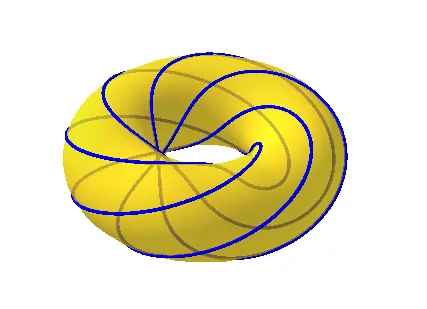
This example demonstrates how to draw and explore various curves on a torus. It involves core mathematical concepts like limits, unit circle, division, similar triangles, and linear equations. The construction uses commands such as Surface and CurveCartesian in GeoGebra. Suitable for high school and above students studying spatial geometry and analytical geometry.
GeoGebra Commands & Parameters
Surface(((2 + cos(t)) * cos(u)), ((2 + cos(t)) * sin(u)), sin(t), t, 0, (2 * π), u, 0, (2 * π)) → aCurveCartesian(((2 + cos(t)) * cos(b)), ((2 + cos(t)) * sin(b)), sin(t), t, 0, (2 * π)) → dCurveCartesian(((2 + cos(c)) * cos(t)), ((2 + cos(c)) * sin(t)), sin(c), t, 0, (2 * π)) → eCurveCartesian(((2 + cos((c * t))) * cos((b * t))), ((2 + cos((c * t))) * sin((b * t))), sin((c * t)), t, 0, (20 * π)) → f
AI Drawing Prompt Reference
Draw a torus and then three different parameter curves on it. First, draw the torus with the equation ((2 + cos(t)) * cos(u)), ((2 + cos(t)) * sin(u)), sin(t), where t and u range from 0 to 2π. Then, draw three curves with parameters b, c, and c*t and b*t respectively, where t ranges from 0 to 20π.
The prompt above was compiled from the original drawing commands and is for reference only.