
Curves from Parametric Equations
Loading the math board and drawing, please wait…
In collections
Curves given by parametric or polar equations
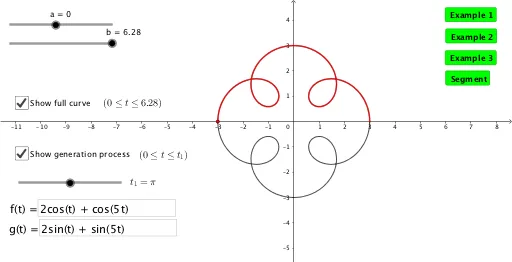
This example demonstrates how to plot 2D curves using parametric equations. Key math concepts include parametric equations, coordinate geometry, and trigonometry. Construction highlights involve using commands like Textfield and CurveCartesian, with parameters a, b, and variable tt, alongside InputBoxes for dynamic input. Suitable for high school and above students learning parametric equations applications.
GeoGebra Commands & Parameters
Textfield(f) → InputBox1Textfield(g) → InputBox2CurveCartesian(f(t), g(t), t, a, b) → fullCurveCurveCartesian(f(t), g(t), t, a, tt) → partialCurve
AI Drawing Prompt Reference
Plot a 2D curve defined by parametric equations. First, input two parametric equations f(t) and g(t). Then, use these equations to draw a full curve from t=a to t=b. Next, use the same equations to draw a partial curve from t=a to t=tt, where tt is a dynamic input.
The prompt above was compiled from the original drawing commands and is for reference only.