
Curved Surface Area of Cone by Rocio Trejo
Loading the math board and drawing, please wait…
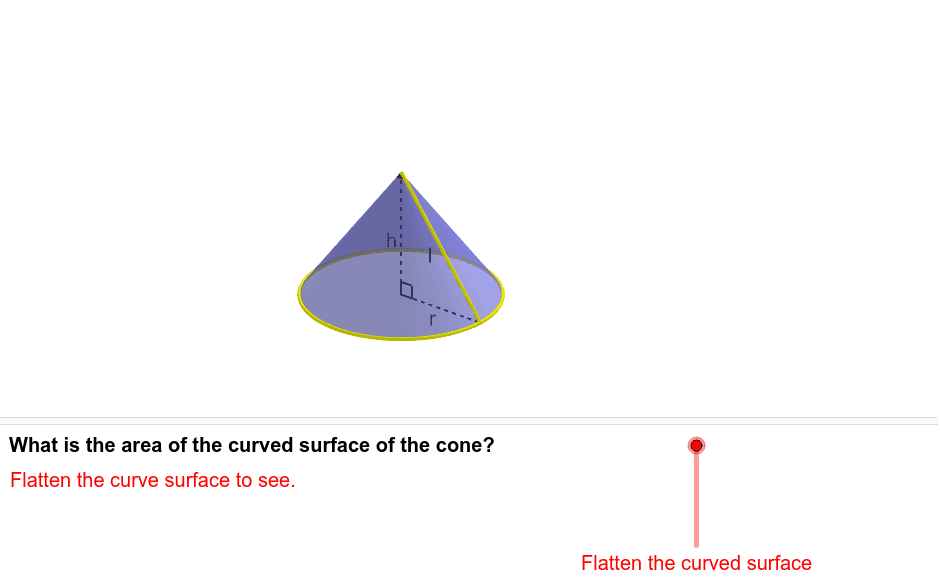
This example demonstrates how the curved surface of a cone can be flattened into a sector, and then dissected and rearranged to understand its area formula πrl. The example involves concepts of cones, sectors, and vectors, and uses GeoGebra commands such as point, circle arc, vector, etc. It is suitable for high school mathematics education and learning.
GeoGebra Commands & Parameters
Point(CircleArc[(0, 1), (1, 1), (0, 0)]) → QIf(y(Q) > 0, CircleArc[(0, 1), (0, 0), Q], 6.283185307179586) → sIf(y(Q) > 0, Angle[(0, 0), (0, 1), Q], 6.283185307179586) → α'Sequence((sin((i * θ)), 1 - cos((i * θ))), i, 0, (2 * n)) → list1If(t ≤ 1, t, 1) → kIf(t ≥ 1, t - 1, 0) → k'Sequence(If[k < 1, (x(O_1) + ((l * sin((i * φ))) * cos((i * φ)) / sin(φ)), y(O_1) + ((l * sin((i * φ))) * sin((i * φ)) / sin(φ))), (x(O_1) + (l * i), y(O_1))], i, 0, (2 * n)) → list2Sequence(Sector[Rotate[Translate[Circle[(x(O_1) + 0, y(O_1) + 1), Element[list1, i]], Vector[Element[list1, i], Element[list2, i]]], (((-((2 * i) - 1)) * k) * θ / 2), Element[list2, i]], Rotate[Translate[Element[list1, i], Vector[Element[list1, i], Element[list2, i]]], (((-((2 * i) - 1)) * k) * θ / 2), Element[list2, i]], Rotate[Translate[Element[list1, i + 1], Vector[Element[list1, i], Element[list2, i]]], (((-((2 * i) - 1)) * k) * θ / 2), Element[list2, i]]], i, 1, n) → list3Sequence(Sector[Rotate[Rotate[Translate[Circle[(x(O_1) + 0, y(O_1) + 1), Element[list1, i]], Vector[Element[list1, i], Element[list2, i]]], (((-((2 * i) - 1)) * k) * θ / 2), Element[list2, i]], (180° * k'), (x(O_1) + (n * l) - sin(θ / 2) / 2, y(O_1) + cos(θ / 2) / 2)], Rotate[Rotate[Translate[Element[list1, i], Vector[Element[list1, i], Element[list2, i]]], (((-((2 * i) - 1)) * k) * θ / 2), Element[list2, i]], (180° * k'), (x(O_1) + (n * l) - sin(θ / 2) / 2, y(O_1) + cos(θ / 2) / 2)], Rotate[Rotate[Translate[Element[list1, i + 1], Vector[Element[list1, i], Element[list2, i]]], (((-((2 * i) - 1)) * k) * θ / 2), Element[list2, i]], (180° * k'), (x(O_1) + (n * l) - sin(θ / 2) / 2, y(O_1) + cos(θ / 2) / 2)]], i, n + 1, (2 * n)) → list4CircleArc((0, 1 / (1 - m)), O_1, L) → bSegment((0, 0), (s, 0)) → dMidpoint(d) → B'CircleArc((0, 1), Q, (0, 0)) → cSegment(O, (x(O), y(O) - 1)) → eMidpoint(e) → GCircle((0, 1), 1) → gMidpoint(Q, O) → HSegment(O, A) → aCircle(P, 1, yAxis) → pIntersect(xOyPlane, p) → D, CRotate(O_1, α, a) → FSurface((u * cos(v)), (u * sin(v)) + 1, f(u), u, 0, abs(x(D)), v, -1.5708, (3 * π / 2) - (2 * γ)) → oRotate(D_1, α, a) → D'CircumcircleArc(D_1, C, D') → qCircle(O, D_1, a) → c_1Segment(P, D') → iSegment(P, D_1) → a_1Point(b) → JSegment(O, D_1) → b_1Vector(A + (0, 0, 0.3), A + (0, 0, 0.06)) → uAngle(D_1, O, A) → β
AI Drawing Prompt Reference
Draw a cone's lateral surface area by first creating a circular arc centered at (0,1), then dividing this arc into multiple sectors through rotation and translation, and rearranging these sectors to form a sector area. Finally, rotate and move this sector area to represent the cone's lateral surface, illustrating the formula for calculating the cone's lateral surface area.
The prompt above was compiled from the original drawing commands and is for reference only.