
Curve Stitching with Rotations: Envelope Curves via Transform
Loading the math board and drawing, please wait…
In collections
Geometry Transformation
Maths for 8th Grade Units 1 to 3
Learn with Lindy: Transformations Intro
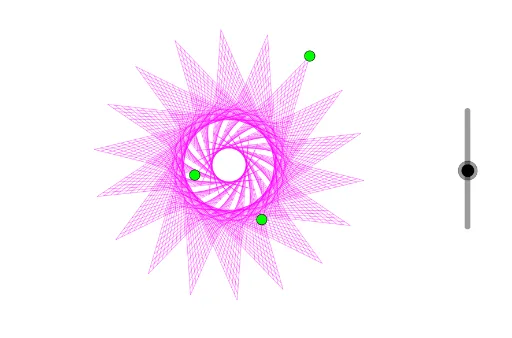
This GeoGebra demonstration illustrates the "Curve Stitching" technique to create elegant envelope curves through rotational transformations. Key mathematical concepts include rotation, dilation (scaling), sequences, vector operations in 2D, and function graphing. Construction details: The PolyLine command draws straight line segments connecting sequential points, while the Sequence command generates ordered point collections and segment series. Combined with rotation and translation transformations, periodic patterns emerge organically. The construction uses objects A, B, C, function f, and line segments L_1 through L_4. This example is ideal for secondary school mathematics lessons on rotational transformations, as well as supplementary material for college-level courses in coordinate geometry and parametric equations, helping students intuitively understand how families of straight lines can form smooth curves through transformations.
GeoGebra Commands & Parameters
PolyLine(A, B, C) → fSequence(A + (w * (B - A)), w, 0, 1, 1 / 25) → L_1Sequence(B + (w * (C - B)), w, 0, 1, 1 / 25) → L_2Sequence(Segment[L_1(w), L_2(w)], w, 1, 26) → L_3Sequence(Rotate[L_3, ((w * 2) * π / n)], w, 1, n) → L_4
AI Drawing Prompt Reference
Draw a curve stitching graph generated by rotational and scaling transformations. The graph includes an initial straight line segment and multiple points generated through a sequence. These points form a series of line segments via rotation and scaling. Connecting these segments yields smooth curves. The graph illustrates how rotations and scalings transform straight lines into curves, suitable for math teaching.
The prompt above was compiled from the original drawing commands and is for reference only.