
Curve Smoothing Demonstration
Loading the math board and drawing, please wait…
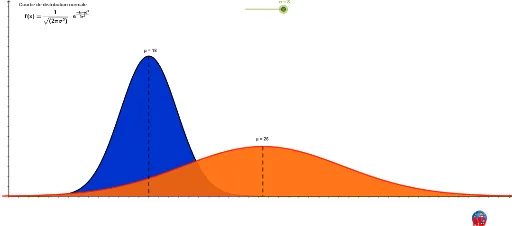
This example demonstrates how to mathematically smooth a curve, showcasing the transformation process of curve shapes. It involves core mathematical concepts such as integration, vectors, transformations, and statistical characteristics. Key GeoGebra commands and objects used in the construction include Integral, Vector, Translate, Line, and Intersect, as outlined in the construction summary. It is suitable for high school and above students to understand function transformations, statistical distributions, and calculus applications.
GeoGebra Commands & Parameters
Integral(f, 18 - (b * 2.84), 18 + (b * 2.84)) → gMidpoint(A, B) → CVector(C, B) → uVector(C, A) → vLine(C, yAxis) → aIntersect(f, a, (26, 0.001865699751326904)) → DSegment(D, C) → cTranslate(h, Vector[(0, 0), (-10.2 + (1.2 * σ), 0)]) → h_1Max(f, 0, 20) → MMax(h_1, 0, 50) → NSegment(M, O) → iSegment(N, P) → jIntegral(h_1, 0, 18 + (b * σ)) → d
AI Drawing Prompt Reference
Demonstrate how to mathematically smooth a curve by using integration, vectors, and transformations. Start with an original curve, find its intersection with the y-axis, create vectors based on this point, build auxiliary lines, and locate intersections with the curve. Show the smoothing process through translation and integration, highlighting the transformation with two additional line segments.
The prompt above was compiled from the original drawing commands and is for reference only.