
Cuboctahedron on a Sphere: Visualizing 12 Vertices
Loading the math board and drawing, please wait…
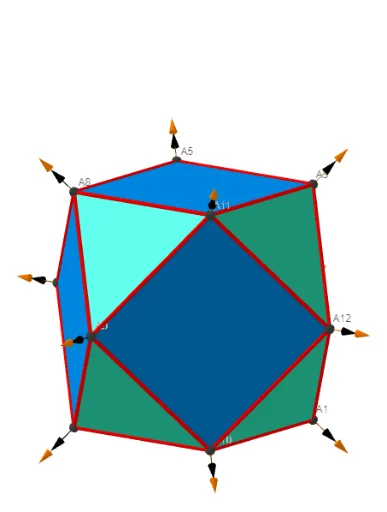
This GeoGebra example demonstrates the cuboctahedron (Cuboctahedron) by constructing and visualizing its 12 vertices in a spherical setting, highlighting the spatial distribution and the structure of its faces. Key concepts include solid geometry, uniform polyhedra/semiregular polyhedra, vertex configuration, and the relationship between spherical display and polygonal face elements (triangles and squares). The construction uses Sphere to create the reference sphere, Points00 and related objects to generate/position the vertex set, and Segments to connect vertices and form the visible edges. Labeling and reporting are implemented with Text, TableText, and Sum to display vertex identifiers and supporting values. The final scene relies on objects such as button controls (button7, button2) for interaction, a triangle marker Δ for face/structure indication, and multiple vertex/edge objects (e.g., ll1bb, bo1–bo10, etc.) to complete the wireframe/label view. Suitable for high school to early university learners, as well as for math visualization and geometry modeling practice.
GeoGebra Commands & Parameters
UnicodeToLetter(34) → u34Text("" + Um1) → txt_pSum(Flatten[Sequence[Append[Sequence[Element[txt_p, i], i, m01(k), m02(k)], " "], k, 1, 5]]) → txtUm1Zip(Vector[a, a + UnitVector[a]], a, Points00) → lVector1Zip(Vector[a, a + (1.5 * UnitVector[b])], a, Points00, b, Wi_Pc) → lVector2Zip(Vector[a, a + (1.5 * UnitVector[b])], a, Points00, b, Wi_P) → lVector3Sphere((0, 0, 0), 5) → sphTableText(Append["i", 1…n], Append[" \fgcolor{orange}{GM :Δφ_i}, rad", l1w], Append["\fgcolor{magenta}{GC :Δφ_i} , rad", l1cw], "v") → text23rZip(Segment[Element[Points00, y(a)], Element[Points00, z(a)]], a, ll1bb(1)) → ll1Zip(Segment[Element[Points00, y(a)], Element[Points00, z(a)]], a, ll1bb(2)) → ll2Zip(Segment[Element[Points00, y(a)], Element[Points00, z(a)]], a, ll1bb(3)) → ll3Zip(Segment[Element[Points00, y(a)], Element[Points00, z(a)]], a, ll1bb(4)) → ll4
AI Drawing Prompt Reference
Draw a 3D sphere centered at the origin as a reference. Construct a set of 12 vertices on the spherical setting for a cuboctahedron, and display vertex identifiers next to them. Connect the vertices with straight segments to form a wireframe showing the cuboctahedron’s edge structure, emphasizing faces made from triangles and squares. Include a small triangle marker to indicate the face/structure relationship, and add table-style text annotations that report per-vertex markings together with corresponding radius-related values. Present the solid clearly as it is distributed in space on the sphere.
The prompt above was compiled from the original drawing commands and is for reference only.