
Cuboctahedron by chris cambré
Loading the math board and drawing, please wait…
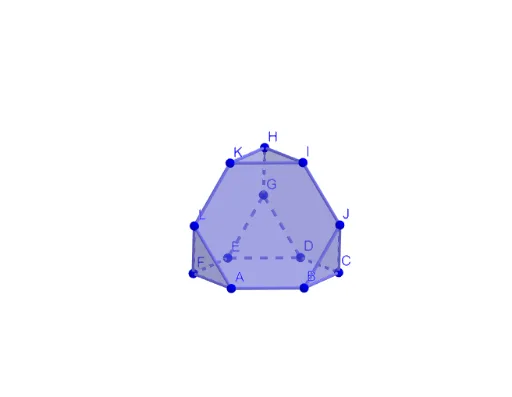
This example demonstrates the geometric construction of a cuboctahedron. It involves concepts such as polygons, rotation, and plane geometry. Using GeoGebra commands like Circle, Intersect, Rotate, and Polygon, the cuboctahedron can be constructed. Suitable for high school geometry education or math enthusiasts.
GeoGebra Commands & Parameters
Circle(OO, 1, xOyPlane) → cIntersect(yAxis, c, 2) → ARotate(A, 60°) → BRotate(A, 120°) → CRotate(A, 180°) → DRotate(A, 240°) → ERotate(A, 300°) → FPolygon(A, B, C, D, E, F) → veelhoek1, a, b, c_1, d, e, fPolygon(B, A, 6, xOyPlane) → veelhoek2, g, J_1, h, i, j, k, l, G_1, H_1, I_1Polygon(D, C, 6, xOyPlane) → veelhoek3, m, N, n, p, q, r, s, K_1, L_1, MPolygon(F, E, 6, xOyPlane) → veelhoek4, t, R, f_1, g_1, h_1, i_1, j_1, O, P, QCircle(c_1, K_1) → d_1Circle(a, J_1) → e_1Intersect(e_1, d_1) → J, T, ,Line(D, C) → k_1OrthogonalLine(K_1, k_1, xOyPlane) → l_1Intersect(k_1, l_1) → KKAngle(K_1, KK, J) → αRotate(veelhoek3, (-α), c_1) → veelhoek3'Line(OO, OOO) → asRotate(veelhoek3', 120°, as) → veelhoek3''Rotate(veelhoek3', (-(120°)), as) → veelhoek3''_1Rotate(J, (-(120°)), as) → LRotate(J, 120°, as) → GMidpoint(L, J) → UOrthogonalLine(U, veelhoek3''_1) → mmRotate(J, (-(60°)), mm) → IRotate(I, 120°, as) → HRotate(I, (-(120°)), as) → KPolygon(D, E, G) → driehoek1, s'_1, d_2, e_2Rotate(driehoek1, 120°, as) → driehoek1'Rotate(driehoek1, (-(120°)), as) → driehoek1'_1
AI Drawing Prompt Reference
Draw a cuboctahedron by first creating a circle, then using rotation and polygon construction to form six squares and eight equilateral triangles. The steps include rotating point A to form other vertices, constructing polygons, rotating polygons and adjusting angles to form the structure of the cuboctahedron.
The prompt above was compiled from the original drawing commands and is for reference only.