
Cube
Loading the math board and drawing, please wait…
In collections
The GeoGebra's Toolbox for Teachers and Students
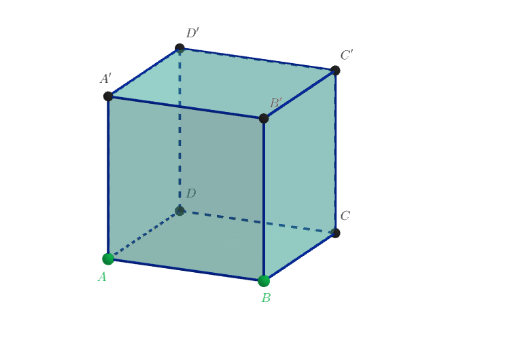
This is a basic cube shape for teaching and learning. Using GeoGebra commands such as PointIn, Polygon, and Cube, various faces and edges of the cube can be constructed. Suitable for middle school and above students to learn solid geometry.
GeoGebra Commands & Parameters
PointIn(z = 0) → APointIn(z = 0) → BPolygon(A, B, 4, xOyPlane) → poli1, f, g, h, i, C, DCube(A, B, zAxis) → a, E, facciaBEIH, facciaEFJI, facciaGHIJ, spigoloAF, spigoloAB, spigoloBE, spigoloEF, spigoloAG, spigoloFJ, spigoloGJ, F, spigoloGH, spigoloBH, spigoloHI, spigoloEI, spigoloIJ, A', B', C', D', facciaABEF, facciaAFJG, facciaABHGSegment(A', C) → j
AI Drawing Prompt Reference
Draw a cube with six square faces and twelve edges. First, draw two points on the same plane along the z-axis. Then, connect these two points and several other points to form a polygon. Next, use these points and the z-axis to construct a cube. Finally, draw line segments connecting the cube's vertices.
The prompt above was compiled from the original drawing commands and is for reference only.