
Cube Surface Area Calculation
Loading the math board and drawing, please wait…
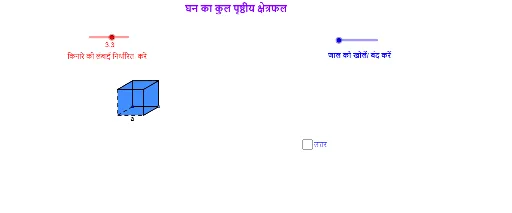
This example demonstrates the calculation and visualization of the total surface area of a cube. It involves core mathematical concepts such as geometric shapes (cube), area calculation, and three-dimensional space. Key GeoGebra commands used include Point, Segment, Polygon, Circle, Line, Intersect, Rotate, OrthogonalLine, CircleArc, Vector, Translate, Ray, LineBisector, If, and Midpoint to construct the cube model and compute its surface area. Suitable for high school solid geometry teaching or for math enthusiasts studying spatial geometry and surface area calculations.
GeoGebra Commands & Parameters
Point(Circle[A, s]) → BSegment(A, B) → aPolygon(A, B, 4) → poly1, a_1, b, c, d, C, DCircle(B, e) → fLine(A, B) → gIntersect(f, g, 2) → ERotate(E, 30°, B) → E'OrthogonalLine(E', g) → hSegment(B, E') → iLine(C, i) → jIntersect(h, j) → FPolygon(E', F, 4) → poly2, e', f_1, k, l, G, HPolygon(A, H, G, D) → poly3, a_2, h_1, g_1, d_1Polygon(C, F, E', B) → poly4, c_1, f_2, e'_1, b_1Circle(B, A) → pCircle(A, B) → qIntersect(q, g, 2) → IIntersect(p, g, 2) → JCircle(J, B) → rIntersect(r, g, 2) → KLine(J, e'_1) → mLine(K, e'_1) → nLine(I, a_2) → tLine(H, E') → e_1Intersect(t, e_1) → LIntersect(m, e_1) → MIntersect(n, e_1) → NLine(B, E') → i_1Line(A, H) → j_1Intersect(f, i_1, 2) → OLine(O, g) → k_1Circle(E', B) → p_1Intersect(p_1, i_1, 2) → PLine(P, e_1) → l_1Intersect(j_1, l_1) → QLine(C, B) → m_1Circle(C, B) → q_1Intersect(q_1, m_1, 2) → RLine(R, c_1) → n_1Intersect(h, n_1) → SIntersect(j_1, k_1) → TCircleArc(C, R, D) → r_1CircleArc(B, K, R) → s_1CircleArc(E', N, S) → t_1CircleArc(E', M, F) → c_2CircleArc(B, J, C) → d_2CircleArc(A, B, I) → e_2CircleArc(H, G, L) → g_2CircleArc(F, S, G) → h_2Vector(F, P) → uVector(C, O) → vVector(D, R) → wVector(S, N) → u_1Vector(D, I) → v_1Translate(D, Vector[(o * w)]) → D'_1Ray(C, D'_1) → b_2Intersect(r_1, b_2, 1) → UTranslate(G, Vector[(o * w)]) → G'_1Ray(F, G'_1) → i_2Intersect(h_2, i_2, 1) → VLineBisector(F, P) → j_2Intersect(f, j_2, 2) → WCircleArc(W, P, F) → k_2Line(W, l_1) → l_2LineBisector(G, Q) → m_2Intersect(l_2, m_2) → ZCircleArc(Z, Q, G) → p_2Translate(C, Vector[((o - 1) * v)]) → C'Translate(D, Vector[((o - 1) * v)]) → D'_2If(o < 1, C, If[o < 2, C', O]) → A_1If(o < 1, D, If[o < 2, D'_2, T]) → B_1Translate(D, Vector[((o - 2) * v_1)]) → D'Translate(G, Vector[((o - 2) * v_1)]) → G'_2Ray(A, D') → n_2Ray(H, G'_2) → q_2Intersect(e_2, n_2, 1) → C_1Intersect(g_2, q_2) → D_1,If(o < 2, G, If[o < 3, D_1, L]) → E_1If(o < 2, D, If[o < 3, C_1, I]) → F_1Translate(G, Vector[((o - 3) * u)]) → G'Translate(F, Vector[((o - 3) * u)]) → F'Ray(H, G') → r_2Ray(E', F') → s_2Intersect(p_2, r_2, 1) → G_1Intersect(k_2, s_2, 1) → H_1If(o < 3, G, If[o < 4, G_1, Q]) → I_1If(o < 3, F, If[o < 4, H_1, P]) → J_1Translate(S, Vector[((o - 4) * u_1)]) → S'Ray(E', S') → t_2Intersect(t_1, t_2, 1) → K_1Intersect(c_2, t_2, 1) → L_1Translate(R, Vector[((o - 4) * u_1)]) → R'Ray(B, R') → a_3Intersect(s_1, a_3, 1) → M_1Intersect(d_2, a_3, 1) → N_1If(o < 1, U, If[o < 4, R, If[o < 5, M_1, K]]) → O_1If(o < 1, V, If[o < 4, S, If[o < 5, K_1, N]]) → P_1If(o < 4, C, If[o < 5, N_1, J]) → Q_1If(o < 4, F, If[o < 5, L_1, M]) → R_1Midpoint(B, E') → S_1Midpoint(A, H) → T_1Line(T_1, S_1) → c_3Circle(S_1, a / 2) → d_3OrthogonalLine(S_1, c_3) → g_3Intersect(d_3, g_3) → U_1, V_1Polygon(U_1, V_1, 4) → poly11, u_2, v_2, k_3, l_3, W_1, Z_1Polygon(Z_1, W_1, 4) → poly12, z_1, w_1, m_3, n_3, A_2, B_2Polygon(U_1, Z_1, 4) → poly13, u_3, z_2, s_3, t_3, C_2, D_2Polygon(W_1, V_1, 4) → poly14, w_2, v_3, c_4, d_4, E_2, F_2Polygon(V_1, U_1, 4) → poly15, v_4, u_4, e_4, f_4, G_2, H_2Polygon(H_2, G_2, 4) → poly16, h_6, g_4, i_4, j_4, I_2, J_2Segment(B, U_1) → m_4LineBisector(m_4) → n_4Vector(B, U_1) → zVector(T, C_2) → z_4Vector(L, A_2) → u_5Vector(P, E_2) → w_5Translate(I, Vector[(z * (o - 5))]) → I'Translate(A, Vector[(z * (o - 5))]) → A'Translate(B, Vector[(z * (o - 5))]) → B'Translate(J, Vector[(z * (o - 5))]) → J'Translate(K, Vector[(z * (o - 5))]) → K'Translate(L, Vector[(u_5 * (o - 5))]) → L'Translate(H, Vector[(u_5 * (o - 5))]) → H'Translate(E', Vector[(u_5 * (o - 5))]) → E''Translate(M, Vector[(u_5 * (o - 5))]) → M'Translate(N, Vector[(u_5 * (o - 5))]) → N'Translate(T, Vector[(z_4 * (o - 5))]) → T'Translate(O, Vector[(z_4 * (o - 5))]) → O'Translate(P, Vector[(w_5 * (o - 5))]) → P'Translate(Q, Vector[(w_5 * (o - 5))]) → Q'If(o < 5, O_1, If[o < 6, K', I_2]) → K_2If(o < 5, P_1, If[o < 6, N', J_2]) → L_2If(o < 5, Q_1, If[o < 6, J', G_2]) → M_2If(o < 5, R_1, If[o < 6, M', H_2]) → N_2If(o < 5, E', If[o < 6, E'', V_1]) → O_2If(o < 5, H, If[o < 6, H', W_1]) → P_2If(o < 5, E_1, If[o < 6, L', A_2]) → Q_2If(o < 5, J_1, If[o < 6, P', E_2]) → R_2If(o < 5, I_1, If[o < 6, Q', F_2]) → S_2If(o < 5, B, If[o < 6, B', U_1]) → T_2If(o < 5, A, If[o < 6, A', Z_1]) → U_2If(o < 5, A_1, If[o < 6, O', D_2]) → V_2If(o < 5, B_1, If[o < 6, T', C_2]) → W_2If(o < 5, F_1, If[o < 6, I', B_2]) → Z_2Polygon(Z_2, Q_2, P_2, U_2) → poly5, z_3, q_3, p_3, u_6Polygon(U_2, T_2, V_2, W_2) → poly6, u_7, t_4, v_5, w_3Polygon(U_2, P_2, O_2, T_2) → poly7, u_8, p_4, o_2, t_5Polygon(O_2, N_2, M_2, T_2) → poly8, o_1, n_5, m_5, t_6Polygon(N_2, L_2, K_2, M_2) → poly9, n_6, l_4, k_4, m_6Polygon(O_2, R_2, S_2, P_2) → poly10, o_3, r_3, s_4, p_5Intersect(k, v_5) → B_3Segment(G, B_3) → b_3Intersect(v_5, a_2) → A_3Segment(P_2, A_3) → e_3Intersect(t_4, p_5) → C_3Intersect(m_5, p_5) → D_3Segment(D_3, C_3) → f_3Segment(D_3, P_2) → h_3Point(Circle[E_3, s]) → F_3Segment(E_3, F_3) → j_3Line(E_3, F_3) → a_4Circle(F_3, e) → h_4Intersect(h_4, a_4, 2) → G_3Rotate(G_3, 30°, F_3) → H_3Segment(F_3, H_3) → b_4Line(H_3, j_3) → q_4Line(E_3, b_4) → r_4Intersect(q_4, r_4) → I_3OrthogonalLine(H_3, q_4) → a_5OrthogonalLine(F_3, j_3) → b_5OrthogonalLine(E_3, a_4) → c_5OrthogonalLine(I_3, q_4) → d_5Circle(E_3, s) → e_5Intersect(e_5, c_5, 2) → J_3OrthogonalLine(J_3, c_5) → f_5Circle(I_3, s) → g_5Intersect(g_5, d_5, 2) → K_3OrthogonalLine(K_3, d_5) → h_5Intersect(a_5, h_5) → L_3Intersect(b_5, f_5) → M_3Polygon(J_3, M_3, L_3, K_3) → poly17, j_5, m_7, l_5, k_5Polygon(J_3, E_3, F_3, M_3) → poly18, j_6, e_6, f_6, m_8Polygon(F_3, M_3, L_3, H_3) → poly19, f_7, m_9, l_6, h_7Polygon(I_3, K_3, L_3, H_3) → poly20, i_5, k_6, l_7, h_8Polygon(E_3, J_3, K_3, I_3) → poly21, e_7, j_7, k_7, i_6Polygon(E_3, I_3, H_3, F_3) → poly22, e_8, i_7, h_9, f_8Midpoint(l) → N_3Midpoint(e'_1) → O_3Midpoint(b) → P_3Midpoint(e'_1) → Q_3
AI Drawing Prompt Reference
Draw a cube and calculate its surface area. Start by creating vertices A and B, then create edge a using A and B. Next, use A, B, and C to create a quadrilateral, and then create other edges and faces of the cube through rotation and intersection. Finally, draw the boundaries of each face to complete the cube construction.
The prompt above was compiled from the original drawing commands and is for reference only.