
Exploring Area Relationship Between Triangle and Parallelogram
Loading the math board and drawing, please wait…
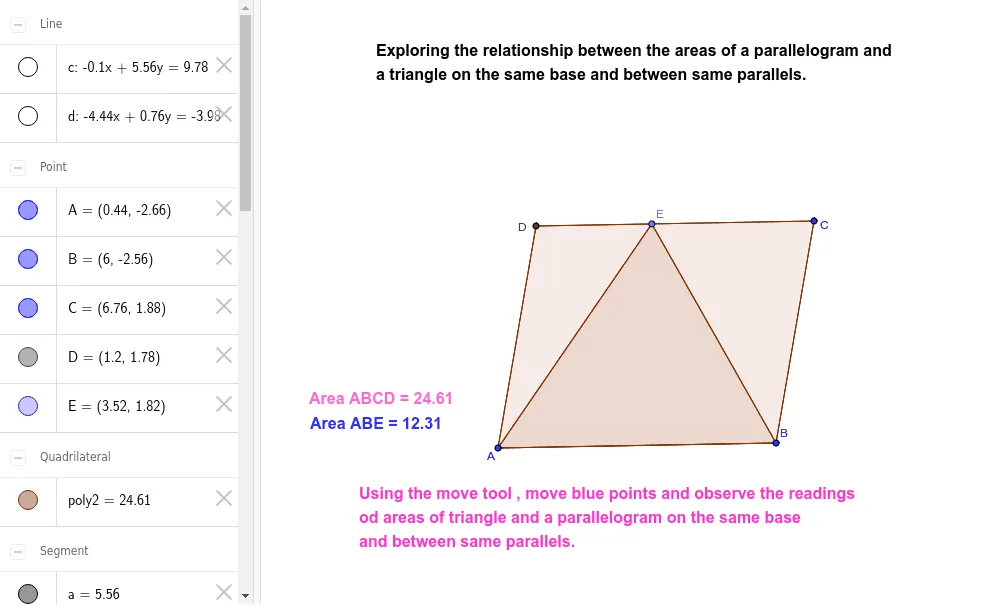
This example demonstrates the relationship between the areas of a triangle and a parallelogram drawn on the same base and between the same parallels. Key math concepts include area calculation, properties of parallelograms, and triangle properties. Construction highlights involve commands/objects like Segment, Line, Intersect, Point, Polygon from GeoGebra. Suitable for middle school and above, ideal for teaching demonstrations or student exploration on geometric area relationships.
GeoGebra Commands & Parameters
Segment(A, B) → aSegment(B, C) → bLine(C, a) → cLine(A, b) → dIntersect(d, c) → DSegment(C, D) → eSegment(D, A) → fPoint(e) → ESegment(A, E) → gSegment(E, B) → hPolygon(A, B, E) → poly1, e_1, a_1, b_1Polygon(A, B, C, D) → poly2, a_2, b_2, c_1, d_1
AI Drawing Prompt Reference
Draw a triangle ABC and a parallelogram with AB as the base and CD as the top side, where CD is parallel to AB. First, draw segment AB, then draw segment BC, followed by a line parallel to AB through C, and a line parallel to BC through A, which intersect at point D. Then, draw segment CD and segment AD. Finally, draw two triangles with AB and E as one side, where the third vertex of one triangle is E and the third vertex of the other triangle is C.
The prompt above was compiled from the original drawing commands and is for reference only.