
Cube Nets by milanofff
Loading the math board and drawing, please wait…
In collections
Cuboids & their Nets
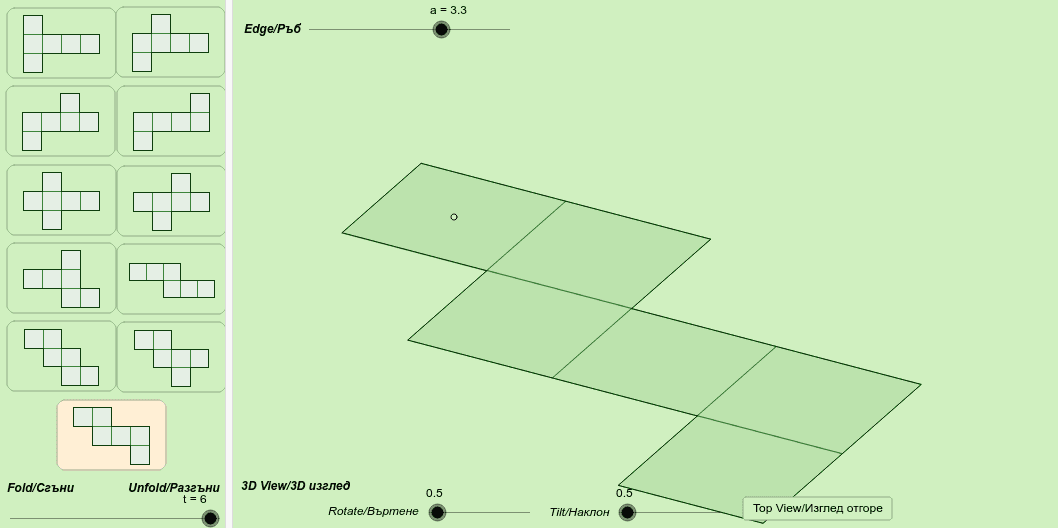
This example demonstrates the 11 nets of a cube. It involves basic concepts of solid geometry, and uses GeoGebra commands such as Line, If, Polygon, Translate, and PolyLine to visually show the process of unfolding a cube. Suitable for middle school and above students learning solid geometry.
GeoGebra Commands & Parameters
Line(O, u) → OxLine(O, v) → OyLine(O, w) → OzIf(t < 1, 1, If[(t ≥ 1) ∧ (t < 2), 2 - t, 0]) → t2If(t < 2, 1, If[(t ≥ 2) ∧ (t < 3), 3 - t, 0]) → t3If(t < 3, 1, If[(t ≥ 3) ∧ (t < 4), 4 - t, 0]) → t4If(t < 4, 1, If[(t ≥ 4) ∧ (t < 5), 5 - t, 0]) → t5If(t < 0, 1, If[t < 1, 1 - t, 0]) → t1If(t < 0, 0, If[t < 1, t, 1]) → t11If(t < 2, 0, If[(t ≥ 2) ∧ (t < 3), t - 2, 1]) → t31If(t < 3, 0, If[(t ≥ 3) ∧ (t < 4), t - 3, 1]) → t41If(t < 1, 0, If[(t ≥ 1) ∧ (t < 2), t - 1, 1]) → t21If(t < 4, 0, If[(t ≥ 4) ∧ (t < 6), t - 4, 1]) → t51If(t < 5, 1, If[(t ≥ 5) ∧ (t < 6), 6 - t, 0]) → t6If(t < 5, 0, If[(t ≥ 5) ∧ (t < 6), t - 5, 1]) → t61Polygon({A, B, C, D}) → ABCD, , , ,Translate(E, Vector[A, B]) → FPolygon({A, E, F, B}) → AEFB, , , ,If(t < 1, E + a * (-cos(t11 * π / 2) * u + sin(t11 * π / 2) * w), E + a * (cos(t2 * π / 2) * u + sin(t2 * π / 2) * w)) → GPolygon({E, G, H, F}) → EGHF, , , ,If(t < 1, G + Vector[E, A], If[t < 2, G + a * (-cos(t21 * π / 2) * u + sin(t21 * π / 2) * w), G + a * (cos(t3 * π / 2) * u + sin(t3 * π / 2) * w)]) → IPolygon({G, I, J, H}) → GIJH, , , ,Polygon({D, L, K, A}) → DLKA, , , ,Polygon({B, M, N, C}) → BMNC, , , ,If(t < 1, F + a * (-cos(t11 * π / 2) * u + sin(t11 * π / 2) * w), F + a * (-cos(t2 * π / 2) * v + sin(t2 * π / 2) * w)) → M2Polygon({F, M2, N2, B}) → FMNB2, , , ,If(t < 2, J, H + a * (-cos(t3 * π / 2) * v + sin(t3 * π / 2) * w)) → M3Polygon({H, M3, N3, F}) → HMNF3, , , ,If(t < 2, N3, If[t < 3, J + a * (-cos(t31 * π / 2) * u + sin(t31 * π / 2) * w), J + a * (-cos(t4 * π / 2) * v + sin(t4 * π / 2) * w)]) → M4Polygon({J, M4, N4, H}) → JMNH4, , , ,If(t < 1, E + a * (-cos(t11 * π / 2) * u + sin(t11 * π / 2) * w), E + a * (cos(t2 * π / 2) * v + sin(t2 * π / 2) * w)) → K5Polygon({A, L5, K5, E}) → ALKE5, , , ,If(t < 2, I, G + a * (cos(t3 * π / 2) * v + sin(t3 * π / 2) * w)) → I7Polygon({E, J7, I7, G}) → EJIG7, , , ,If(t < 2, J, If[t < 3, I7 + a * (-cos(t31 * π / 2) * v + sin(t31 * π / 2) * w), I7 + a * (cos(t4 * π / 2) * u + sin(t4 * π / 2) * w)]) → K7Polygon({I7, K7, L7, G}) → IKLG7, , , ,If(t < 3, K7 + Vector[I7, J7], If[t < 4, K7 + a * (-cos(t41 * π / 2) * u + sin(t41 * π / 2) * w), K7 + a * (cos(t5 * π / 2) * u + sin(t5 * π / 2) * w)]) → M8Polygon({K7, M8, N8, L7}) → KMNL8, , , ,If(t < 1, K5 + Vector[E, F], If[t < 2, K5 + a * (-cos(t21 * π / 2) * v + sin(t21 * π / 2) * w), K5 + a * (cos(t3 * π / 2) * u + sin(t3 * π / 2) * w)]) → PPolygon({K5, P, Q, E}) → KPQE9, , , ,If(t < 2, P + Vector[K5, L5], If[t < 3, P + a * (-cos(t31 * π / 2) * u + sin(t31 * π / 2) * w), P + a * (cos(t4 * π / 2) * v + sin(t4 * π / 2) * w)]) → RPolygon({K5, S, R, P}) → KSRP9, , , ,If(t < 3, R + Vector[P, Q], If[t < 4, R + a * (-cos(t41 * π / 2) * v + sin(t41 * π / 2) * w), R + a * (cos(t5 * π / 2) * u + sin(t5 * π / 2) * w)]) → TPolygon({R, T, U, P}) → RTUP9, , , ,If(t < 3, R, P + a * (cos(t4 * π / 2) * u + sin(t4 * π / 2) * w)) → T10Polygon({P, T10, U10, Q}) → PTUQ10, , , ,If(t < 3, T10 + Vector[P, K5], If[t < 4, T10 + a * (-cos(t41 * π / 2) * u + sin(t41 * π / 2) * w), T10 + a * (cos(t5 * π / 2) * v + sin(t5 * π / 2) * w)]) → R11Polygon({P, S11, R11, T10}) → PSRT11, , , ,PolyLine({A, I, J, B, M, N, L, K, A}) → line1PolyLine({A, I, J, F, M2, N2, B, C, L, K, A}) → line2PolyLine({A, I, J, H, M3, N3, F, C, L, K, A}) → line3PolyLine({A, I, M4, N4, H, C, L, K, A}) → line4PolyLine({A, L5, K5, E, I, J, F, M2, N2, B, C, D, A}) → line5PolyLine({A, L5, K5, E, I, J, H, M3, N3, F, C, D, A}) → line6PolyLine({A, E, J7, K7, L7, G, M3, N3, F, C, D, A}) → line7PolyLine({A, E, J7, M8, N8, G, H, C, D, A}) → line8PolyLine({A, L5, K5, S, T, U, P, Q, E, F, C, D, A}) → line9PolyLine({A, L5, K5, S, R, P, T10, U10, E, F, C, D, A}) → line10PolyLine({A, L5, P, S11, R11, U10, E, F, C, D, A}) → line11
AI Drawing Prompt Reference
Draw an unfolded net of a cube, which includes 11 different configurations. Start by drawing the three coordinate axes Ox, Oy, and Oz. Then, based on the value of t, sequentially draw each face, such as ABCD, AEFB, EFGH, and GIJH. Each face is obtained through translation and rotation, ultimately forming the complete net.
The prompt above was compiled from the original drawing commands and is for reference only.