
Cube Net: 11 Different Cube Net Models
Loading the math board and drawing, please wait…
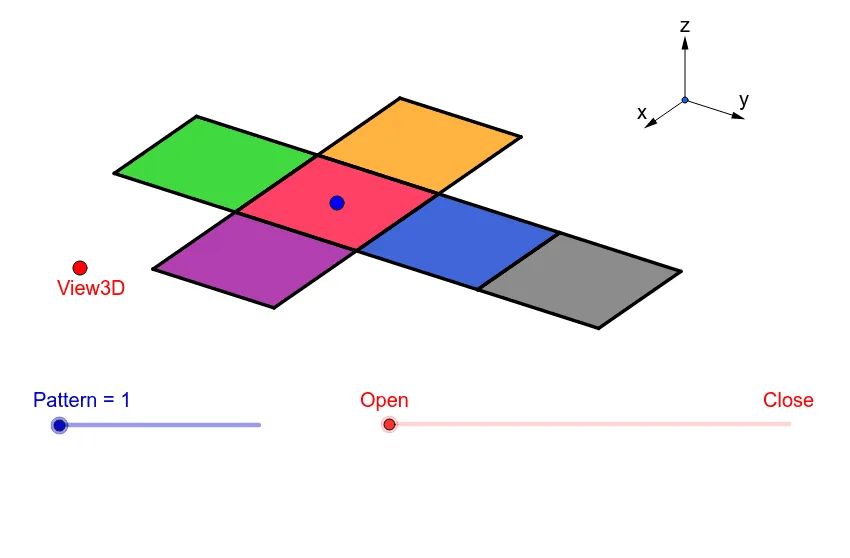
This example demonstrates 11 different nets of a cube, helping to understand the transformation from three-dimensional geometry to two-dimensional flat surfaces. Key mathematical concepts include solid geometry, spatial visualization, and geometric transformation. Construction involves using GeoGebra commands such as Vector, Translate, OrthogonalLine, Polygon, and Midpoint to create and display these nets. Suitable for middle school students or those learning geometry or mathematical modeling.
GeoGebra Commands & Parameters
Vector(B_1, Z) → wVector(B_1, Y) → vVector(B_1, X) → uTranslate(A, Vector[(2 * v)]) → A'Translate(P, Vector[(2 * v)]) → P'OrthogonalLine(View3D, yAxis) → a_1OrthogonalLine(View3D, xAxis) → b_1Polygon(L, K, N, M) → poly1, l, k_1, n, mPolygon(K, P, Q, N) → poly2, k_2, p, q, n_1Polygon(L, M, S, R) → poly3, l_1, m_1, s, rPolygon(N, V, W, M) → poly4, n_2, v_1, w_1, m_2Polygon(K, T, U, L) → poly5, k_3, t, u_1, l_2Polygon(B, Q, P, A) → poly6, b_2, q_1, p_1, a_2Midpoint(R, M) → DTranslate(S, Vector[(-((2 * v)))]) → S'Segment(S, C) → eTranslate(M, Vector[((-2) * v)]) → M'Segment(M, E) → fSegment(E, C) → hTranslate(N, Vector[((-2) * v)]) → N'Translate(Q, Vector[((-2) * v)]) → Q'_1Segment(Q, F) → iSegment(N, G) → jSegment(G, F) → d_1Translate(Q, Vector[((-2) * v)]) → Q'_2Translate(B, Vector[((-2) * v)]) → B'_1Segment(B, I) → e_1Segment(I, H) → f_1Segment(H, Q) → g_1Translate(K, Vector[(2 * v)]) → K'Translate(P, Vector[(2 * v)]) → P'_1Segment(P, J) → h_1Segment(J, A_1) → i_1Segment(A_1, K) → j_1Segment(B, H_1) → s_1Segment(H_1, C_1) → cSegment(C_1, A) → r_1Midpoint(N, P) → D_1Midpoint(k_1) → F_1Segment(A, G_1) → t_1Segment(G_1, I_1) → c_2Segment(I_1, P) → d_2Segment(J, K_1) → f_2Segment(P, L_1) → e_2Segment(L_1, K_1) → g_2Segment(M, W) → h_2Mirror(L_1, F_1) → O_1Mirror(K_1, F_1) → P_1Segment(M, M_1) → i_2Segment(N_1, J_1) → j_2Segment(J_1, M_1) → p_2Polygon(M, E, C, S) → poly7, q_2, r_2, s_2, t_2Polygon(Q, N, G, F) → poly8, q_3, n_3, g_3, f_3Polygon(B, Q, H, I) → poly9, b_3, q_4, h_3, i_3Polygon(J, A_1, K, P) → poly10, j_3, a_3, k_4, p_3Polygon(C_1, A, B, H_1) → poly11, c_3, a_4, b_4, h_4Polygon(G_1, I_1, P, A) → poly12, g_4, i_4, p_4, a_5Polygon(K_1, J, P, L_1) → poly13, k_5, j_4, p_5, l_3Polygon(M, M_1, J_1, N_1) → poly14, m_3, m_4, j_5, n_4
AI Drawing Prompt Reference
Draw an unfolded cube, showing 11 different nets. The figure should include squares and connecting lines to represent the transformation from 3D to 2D. The construction order should start from the cube and gradually unfold the faces, ensuring the figure is clear and understandable.
The prompt above was compiled from the original drawing commands and is for reference only.