
Cube Geometry: Shortest Path Between Points - A Net
Loading the math board and drawing, please wait…
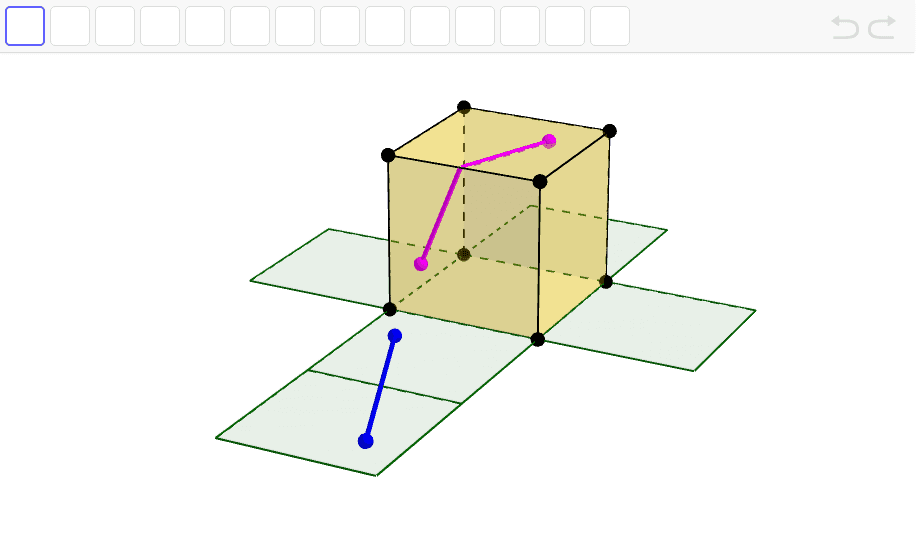
This interactive GeoGebra applet demonstrates the shortest path between two points on the surface of a cube, shown both on the 3D cube and its net (unfolded surface). The core mathematical concept is the shortest path on a polyhedron, which is solved by unfolding the cube into a plane and using the straight-line distance. The construction uses GeoGebra commands such as Cube, Point, PointIn, Intersect, IntersectPath, Segment, Polygon, and Plane to create the cube, place points on adjacent faces, compute the intersection path, and draw the segments. The net is built from polygons representing each face, with the corresponding path displayed for comparison. This applet is suitable for high school or introductory college students studying solid geometry, spatial reasoning, and optimization problems, and can be used in classroom demonstrations or self-study.
GeoGebra Commands & Parameters
Intersect(yAxis, zAxis) → APoint(xAxis) → BPoint(Circle[B, Distance[A, B], Segment[A, B]]) → CCube(A, B, C) → a, D, faceCDHG, faceEFGH, edgeAD, edgeAB, edgeBC, edgeCD, edgeAE, edgeDH, edgeEH, edgeEF, E, edgeBF, edgeFG, edgeCG, edgeGH, F, G, H, faceABCD, faceADHE, faceABFE, faceBCGFPointIn(faceEFGH) → IPointIn(faceABFE) → JOrthogonalPlane(J, edgeEF) → bOrthogonalPlane(I, edgeEF) → cIntersect(edgeEF, b) → KIntersect(edgeEF, c) → LOrthogonalPlane(J, edgeBF) → dIntersectPath(c, d) → eOrthogonalPlane(I, edgeFG) → f_1IntersectPath(f_1, d) → gIntersect(e, faceABFE) → MSegment(J, M) → hSegment(M, L) → iSegment(L, I) → jVector(L, K) → uSegment(J, N) → kSegment(N, I) → lPolygon(B, A, 4, xOyPlane) → poly1, m, n, p, q, f, PPolygon(P, f, 4, xOyPlane) → poly2, r, s, t, a_1, O, QPolygon(A, D, 4, xOyPlane) → poly3, b_1, c_1, d_1, e_1, R, SPolygon(C, B, 4, xOyPlane) → poly4, g_1, h_1, i_1, j_1, T, UPolygon(D, C, 4, xOyPlane) → poly5, k_1, l_1, m_1, n_1, V, WCircle(edgeAB, J) → q_1IntersectIntersect(xOyPlane, q_1) → C_1, D_1Circle(edgeEF, I) → p_1Plane(A, E, F) → oIntersect(o, p_1) → Z, A_1Circle(edgeAB, A_1) → r_1Intersect(xOyPlane, r_1) → B_1, E_1Segment(D_1, E_1) → s_1
AI Drawing Prompt Reference
Draw a cube showing the shortest path between two points on its surface, both in 3D and on an unfolded net. The cube has six faces, and the path appears as a straight line on the net. The path starts from a point on the cube and ends at another point, visible in the unfolded view. The net is made by unfolding the cube's faces, and the path is clearly shown there.
The prompt above was compiled from the original drawing commands and is for reference only.