
Cross Sections of Sphere and Cone
Loading the math board and drawing, please wait…
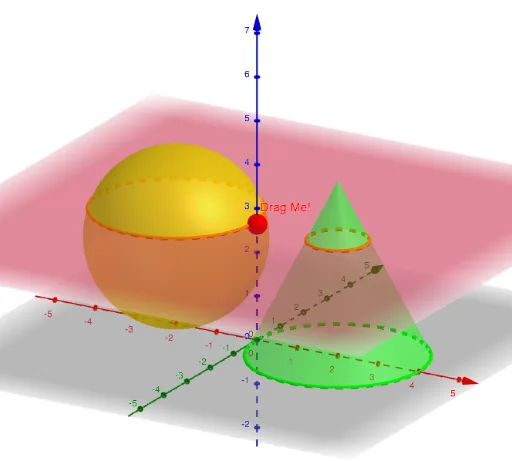
This GeoGebra example demonstrates the cross sections formed when a sphere and a cone intersect, allowing users to dynamically adjust the cutting plane and observe how the intersection curves change from circles to ellipses, parabolas, and hyperbolas. The core mathematical concepts include solid geometry, conic sections, and the intersection of planes with curved surfaces. Construction details: using the Sphere and Cone commands to create the 3D objects, Point and OrthogonalPlane to define an arbitrary cutting plane, IntersectPath to compute the intersection curves between the plane and both surfaces, and Plane, Intersect, and Segment for auxiliary constructions. This interactive model is ideal for high school or early college students studying spatial geometry and the unified nature of conic sections, and serves as an excellent teaching tool for visualizing the transition from 3D shapes to 2D curves.
GeoGebra Commands & Parameters
Sphere((-2, 0, 2), 2) → aCone((2, 0, 0), (2, 0, 4), 2) → b, c, dPoint(Segment[(0, 0, 6), (0, 0, -1)]) → AOrthogonalPlane(A, zAxis) → eIntersectPath(e, a) → fIntersectPath(e, b) → gPlane(zAxis, xAxis) → hIntersect(h, f) → B, CIntersect(h, g) → D, ESegment(C, B) → iSegment(E, D) → j