
Cross Sections of a Square Pyramid by Joseph Walsh
Loading the math board and drawing, please wait…
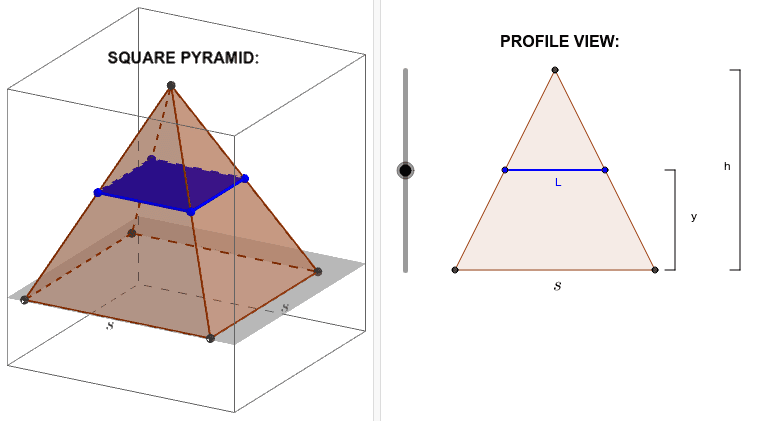
This GeoGebra example demonstrates how different planes intersect a square pyramid to create various polygonal cross-sections. Key mathematical concepts include: cross-section theory in solid geometry, calculation of intersection lines between spatial lines and planes, and properties of planar polygons. Construction points: Use the Pyramid command to construct square pyramid ABCD with vertex E; employ the Polygon command to draw pyramid faces (faceABE, faceBCE, etc.); utilize Intersect and IntersectPath commands to find intersections between planes and the pyramid, generating cross-section polygons; use Segment commands to draw pyramid edges. This example is suitable for high school solid geometry teaching, helping students understand how spatial cross-sections form and how different cutting positions produce varying cross-section shapes.
GeoGebra Commands & Parameters
Intersect(xAxis, yAxis) → APoint(yAxis) → BPoint(xAxis) → DPolygon(A, B, C, D) → poly1, a, b, c, dPyramid(poly1, 4) → e, E, faceABE, faceBCE, faceCDE, faceADE, edgeAE, edgeBE, edgeCE, edgeDEIntersect(xAxis, yAxis) → FPoint(xAxis) → GPolygon(F, G, L) → poly3, l_1, f_1, gIntersectPath(f, e) → poly2, H, I, J, K, i, j, k, lIntersect(m, poly3) → M, NSegment(M, N) → nSegment(O, P) → pSegment(Q, R) → qSegment(O, S) → rSegment(P, T) → sSegment(Q, U) → tSegment(R, V) → a_1
AI Drawing Prompt Reference
Draw a square pyramid with base ABCD and vertex E. Use the intersection of the x-axis and y-axis as two vertices of the base, and draw the base with the Polygon command. Then construct the pyramid with the base and vertex E using the Pyramid command. Next, use the intersection of the x-axis and y-axis as new vertices to form a triangle, and find the intersection lines with the pyramid using the IntersectPath command to create a new polygon. Finally, use the Segment command to connect these intersection points to form the edges and intersection lines of the pyramid.
The prompt above was compiled from the original drawing commands and is for reference only.