
Cross Section Pyramid
Loading the math board and drawing, please wait…
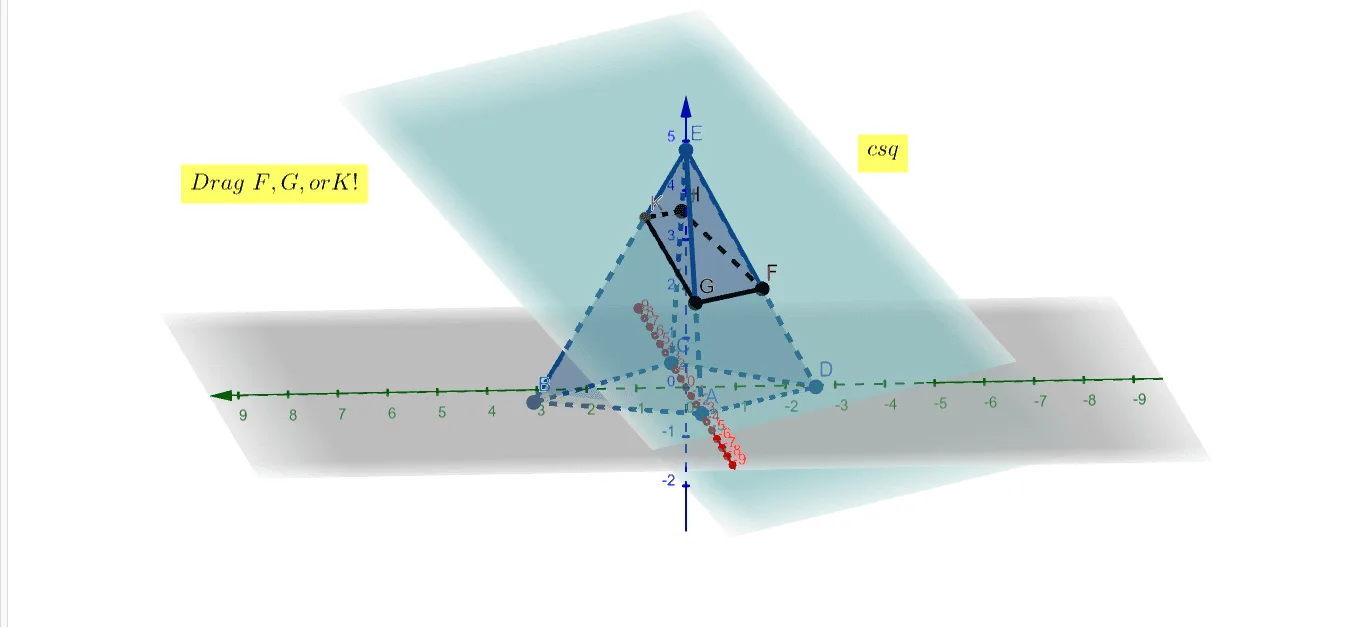
This example dynamically visualizes the 3D shape of a pyramid and its cross-section by calculating intersection points. It involves core math concepts like solid geometry, cross-section analysis, linear programming, derivatives, integrals, and probability statistics (Poisson & Normal distributions). Construction uses commands like Point, Pyramid, Plane, IntersectPath, and Intersect. Suitable for high school and above mathematics education and geometric visualization research.
GeoGebra Commands & Parameters
Point(xAxis) → APoint(xAxis) → CPoint(zAxis) → EPyramid(A, B, C, D, E) → a, faceABCD, edgeAE, edgeBE, edgeCE, edgeDE, faceABE, faceBCE, faceCDE, faceADE, edgeAB, edgeBC, edgeCD, edgeADPoint(edgeDE) → FPoint(edgeAE) → GPoint(edgeCE) → HPlane(F, G, H) → bIntersectPath(b, faceCDE) → fIntersect(b, faceCDE) → I, JSegment(F, G) → gIntersect(edgeBE, b) → KSegment(H, K) → hSegment(K, G) → i
AI Drawing Prompt Reference
Draw a 3D pyramid with a quadrilateral base and an apex above the center. Pick two points on two lateral edges and one point on a base edge, then define a plane through these three points. This plane cuts obliquely through the pyramid, intersecting one side face to form a cross-section path and meeting another lateral edge at a point. Connect the key points of the section with line segments to clearly show the shape and position of the cross-section, while keeping the pyramid's edges and faces visible for spatial understanding.
The prompt above was compiled from the original drawing commands and is for reference only.