
Creating Histograms from Popcorn Party Data
Loading the math board and drawing, please wait…
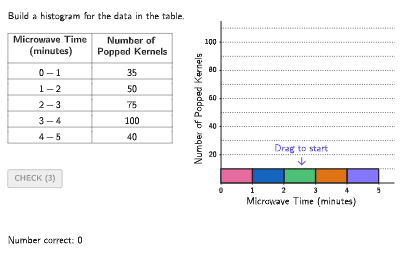
This example demonstrates how to create a histogram from a data table about a popcorn party to visualize statistical information. The core mathematical concepts include data grouping, frequency distribution, and histogram construction rules (no gaps between bars, bar width represents class width). Construction highlights: Using GeoGebra's Bar objects (Bar1a_{1} to Bar5b_{1}) for bar chart creation, input1-5 for receiving user-defined class boundaries, TableText command to display raw data in tabular form, and Sequence/Zip commands for generating dynamic data sequences. The activity includes a timer and correctness checking (correct1-5) for interactive practice. Suitable for Grade 6-8 students to practice organizing data and interpreting histograms.
GeoGebra Commands & Parameters
Sequence(Random[0, 99] / 100, A, 1, 200) → allRandomSeeds, {0.07, 0.62, 0.12, 0.7, 0.46, 0.58, 0.6, 0, 0.71, 0.76, 0.97, 0, 0.36, 0.22, 0.8, 0.19, 0.99, 0.2, 0.44, 0.54, 0.99, 0.02, 0.46, 0.05, 0.29, 0.51, 0.46, 0.69, 0.1, 0.49, 0.82, 0.08, 0.66, 0.25, 0.59, 0.82, 0.11, 0.78, 0.06, 0.5, 0.6, 0.22, 0.52, 0.34, 0.82, 0.85, 0.81, 0, 0.6, 0.87, 0.88, 0.41, 0.23, 0.53, 0.48, 0.16, 0.48, 0.92, 0.24, 0.73, 0.82, 0.18, 0.87, 0.52, 0.26, 0.73, 0.58, 0.9, 0.06, 0.14, 0.36, 0.51, 0.86, 0.03, 0.25, 0.17, 0.13, 0.82, 0.88, 0.96, 0.71, 0.66, 0.22, 0.95, 0.85, 0.63, 0.12, 0.92, 0.43, 0.22, 0.68, 0.72, 0.98, 0.35, 0.68, 0.22, 0.58, 0.56, 0.05, 0.82, 0.01, 0.63, 0.47, 0.5, 0.66, 0.99, 0.42, 0.85, 0.46, 0.8, 0.64, 0.6, 0.77, 0.73, 0.71, 0.78, 0.15, 0.79, 0.06, 0.24, 0.77, 0.73, 0.43, 0.94, 0.74, 0.55, 0.09, 0.09, 0.46, 0.04, 0.92, 0.94, 0.66, 0.36, 0.89, 0.48, 0.83, 0.86, 0.84, 0.9, 0.9, 0.07, 0.86, 0.28, 0.25, 0.72, 0.88, 0.88, 0.6, 0.22, 0.98, 0.48, 0.78, 0.37, 0.41, 0, 0.22, 0.86, 0.88, 0.46, 0.99, 0.66, 0.22, 0.91, 0.04, 0.89, 0.92, 0.28, 0.78, 0.92, 0.43, 0.45, 0.2, 0.71, 0, 0.31, 0.04, 0.43, 0.96, 0.2, 0.67, 0.31, 0.21, 0.3, 0.84, 0.22, 0.66, 0.36, 0.9, 0.65, 0.79, 0.93, 0.25, 0.87, 0.6, 0.51, 0.9, 0.07, 0.64, 0.47}Take(allRandomSeeds, randIndex, randIndex + numRandoms - 1) → currentRandomSeedsIf(timer < 0, 0, timer) → timerAnsZip(If[timer ≟ 1 ∧ A ≟ true, colorTealSuccess, colorBlack], A, correctList) → colorRowSequence((("\color{" * colorRow(A)) * "}") + ((5 * Element[randomFreq, A])), A, 1, 5) → randomFreqColorPolygon(Zip[PixelsToPoint[Corner[1], Corner[3], Corner[5], A], A, {(pixelsLeft, pixelsTop), (pixelsLeft, y(Corner[5]) - pixelsBottom), Corner[5] - (pixelsRight, pixelsBottom), (x(Corner[5]) - pixelsRight, pixelsTop)}]) → borderBoxCorner(5) → layoutAppSizeexpandSegment(PMoveA, PMoveB, (pulsing * 7), Corner[1], Corner[3], Corner[5]) → pulsingObjectonboardingTextOffset(Corner[onboardingText, 1], Corner[onboardingText, 3], onboardingCase, Corner[1], Corner[3], Corner[5]) → OnboardingTextOffsetTableText({"\text\bold{Microwave Time\\ (minutes)}", (("\\\color{" * colorRow(1)) * "}0-1"), (("\\\color{" * colorRow(2)) * "}1-2"), (("\\\color{" * colorRow(3)) * "}2-3"), (("\\\color{" * colorRow(4)) * "}3-4"), (("\\\color{" * colorRow(5)) * "}4-5")}, Append["\text\bold{ Number of\\Popped Kernels}", randomFreqColor], "|_vc") → tableFreqtwoPointBox(Bar1a_{1}, Bar1b_{1}) → bar1_{1}twoPointBox(Bar2a_{1}, Bar2b_{1}) → bar2_{1}twoPointBox(Bar3a_{1}, Bar3b_{1}) → bar3_{1}twoPointBox(Bar4a_{1}, Bar4b_{1}) → bar4_{1}twoPointBox(Bar5a_{1}, Bar5b_{1}) → bar5_{1}Zip(twoPointBox[CLIPBOARDmagicSTRINGA, CLIPBOARDmagicSTRINGB], CLIPBOARDmagicSTRINGA, {Bar1a_{1}, Bar2a_{1}, Bar3a_{1}, Bar4a_{1}, Bar5a_{1}}, CLIPBOARDmagicSTRINGB, {Bar1b_{1}, Bar2b_{1}, Bar3b_{1}, Bar4b_{1}, Bar5b_{1}}) → barOutlines_{1}VerticalText("Number of Popped Kernels") → labelY_{1}Sequence(Text[("" * A), (0, 0) + (A, 0), true, true, 0, -1], A, 0, 5, 1) → questionNumbersX_{1}Sequence(Segment[(0, A), (5.5, A)], A, 10, maxY, 10) → horizGrids_{1}Polygon({(-0.1, -3), (5.5, -3), (5.5, maxFreq + 5), (-0.1, maxFreq + 5)}) → viewBoxZip(Text[("" * CLIPBOARDmagicSTRINGA), (0, 2) + (0, CLIPBOARDmagicSTRINGA), true, true, -1, 0], CLIPBOARDmagicSTRINGA, Sequence[20, (ceil(Max[Append[22, randomFreq]] / 2) * 10), 20]) → questionNumbersY_{1}twoPointBox(Bar1a_{1} + (0, (timerAns * dif1)), Bar1b_{1} + (0, (timerAns * dif1))) → barAns1twoPointBox(Bar2a_{1} + (0, (timerAns * dif2)), Bar2b_{1} + (0, (timerAns * dif2))) → barAns2twoPointBox(Bar3a_{1} + (0, (timerAns * dif3)), Bar3b_{1} + (0, (timerAns * dif3))) → barAns3twoPointBox(Bar4a_{1} + (0, (timerAns * dif4)), Bar4b_{1} + (0, (timerAns * dif4))) → barAns4twoPointBox(Bar5a_{1} + (0, (timerAns * dif5)), Bar5b_{1} + (0, (timerAns * dif5))) → barAns5Zip(Polygon[{(A - 1, 0), (A, 0), (A, Element[inputSaved, A]), (A - 1, Element[inputSaved, A])}], A, incorrectIndexes) → studentAnsSequence(a - 0.3, a, 0.5, 4.5, 1) → crossXleft, {0.2, 1.2, 2.2, 3.2, 4.2}Sequence(a + 0.3, a, 0.5, 4.5, 1) → crossXright, {0.8, 1.8, 2.8, 3.8, 4.8}Sequence((-0.23 * maxY), n, 1, 5) → crossYbtm, {-29.900000000000002, -29.900000000000002, -29.900000000000002, -29.900000000000002, -29.900000000000002}Zip(If[R ≥ A, R, A], R, {randomNum1, randomNum2, randomNum3, randomNum4, randomNum5}, A, inputSaved) → crossYbtmDeprecatedZip(twoPointBox[CLIPBOARDmagicSTRINGA, CLIPBOARDmagicSTRINGB], CLIPBOARDmagicSTRINGA, {Bar1a_{1} + (0, (timerAns * dif1)), Bar2a_{1} + (0, (timerAns * dif2)), Bar3a_{1} + (0, (timerAns * dif3)), Bar4a_{1} + (0, (timerAns * dif4)), Bar5a_{1} + (0, (timerAns * dif5))}, CLIPBOARDmagicSTRINGB, {Bar1b_{1} + (0, (timerAns * dif1)), Bar2b_{1} + (0, (timerAns * dif2)), Bar3b_{1} + (0, (timerAns * dif3)), Bar4b_{1} + (0, (timerAns * dif4)), Bar5b_{1} + (0, (timerAns * dif5))}) → barOutlinesAnsSegment(Bar2a_{1}, (0, y(Bar2a_{1}))) → guide2Segment(Bar3a_{1}, (0, y(Bar3a_{1}))) → guide3Segment(Bar4a_{1}, (0, y(Bar4a_{1}))) → guide4Segment(Bar5a_{1}, (0, y(Bar5a_{1}))) → guide5
AI Drawing Prompt Reference
Create a histogram visualizing popcorn party data, showing the relationship between microwave time and the number of popped kernels. Use colored bars of varying heights to represent the distribution of popped kernels across different time intervals, ensuring no gaps between bars and that their width corresponds to the class width. Include axes and labels below the chart, marking 'Number of Popped Kernels' and 'Microwave Time (minutes).
The prompt above was compiled from the original drawing commands and is for reference only.