
Creating Angles on a Grid
Loading the math board and drawing, please wait…
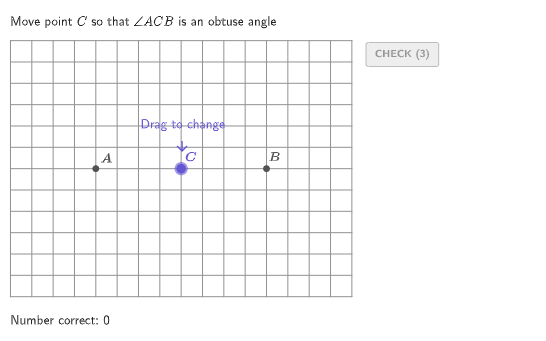
This example demonstrates how to create different types of angles on a grid by moving a third point around two fixed points. The key mathematical concepts involve identifying and drawing angles (acute, right, obtuse, and straight). The construction uses GeoGebra commands such as RandomUniform, Polygon, Angle, and others. It is suitable for students in grades 4-5 for geometry practice.
GeoGebra Commands & Parameters
RandomUniform(0, 0.99, 200) → allRandomSeeds, {0.29175957441687134, 0.12397914842976555, 0.28082368892259707, 0.8167611566633118, 0.7369889489795545, 0.6350615464344525, 0.14795868621133645, 0.6013390059755165, 0.8984748280531879, 0.1743192606927562, 0.7122809603666932, 0.8467107274815218, 0.9898554724443788, 0.23011287684276735, 0.6775606859528955, 0.5792345019203615, 0.08534903299211545, 0.5405419436428717, 0.3632793160303772, 0.47554249956316436, 0.41849734145128614, 0.14141667973480704, 0.459911670815373, 0.3949562842525164, 0.6001571903028503, 0.8985209510726911, 0.30041024418098855, 0.5307449788473522, 0.35174575306570305, 0.28222164439108205, 0.354772508330246, 0.777553289524493, 0.36172921678828474, 0.14563381304694756, 0.050773076026189266, 0.508450239017891, 0.8212641776996717, 0.044142798598010555, 0.13108165163272878, 0.9096099393237453, 0.8887578241992986, 0.03411389031684126, 0.265063173670326, 0.37363323770692464, 0.5529086439345049, 0.02208675420406112, 0.802571137018419, 0.6939552630044665, 0.16952157025167006, 0.09265621175882711, 0.11699512376854974, 0.022656790695128673, 0.14906129322959352, 0.6135829472860902, 0.18571359695841017, 0.11230731854593226, 0.10951484280440422, 0.02045658900404131, 0.827927769232214, 0.2792168799104575, 0.1126799192338404, 0.9304508336287735, 0.12261724816368516, 0.6606579211067791, 0.5314771618366095, 0.24536421421574944, 0.22305854936954664, 0.6322427976896947, 0.46130517745375343, 0.7182324728306769, 0.4989863638071775, 0.23370198442946863, 0.4598140252744335, 0.49532681474471707, 0.10305425372988734, 0.0618069432502336, 0.016768010344952903, 0.30632036585088984, 0.9747640788531907, 0.7981164772882511, 0.9389013366296676, 0.4398084304744648, 0.942485431377163, 0.616599046751104, 0.6338392464958948, 0.7892101932159377, 0.9025750007221895, 0.9219935140410465, 0.9122658101512593, 0.7653595145526649, 0.2539313322025758, 0.7840193492237568, 0.09856361655149695, 0.9468079720253819, 0.03658468814682424, 0.9152323085637921, 0.7071332513059155, 0.32701884061073405, 0.31412304243844147, 0.5914454178626483, 0.24452059448603045, 0.5292216846599369, 0.9018930205066357, 0.07319460651664514, 0.19633717467370962, 0.11472698355255272, 0.5059917868721222, 0.034727545392398786, 0.652753783171657, 0.9689666981764928, 0.08207902944646525, 0.4134285686310568, 0.7370799004853473, 0.2714312036898786, 0.26798934444273736, 0.39746700731745777, 0.028611629031787475, 0.7710148281398529, 0.4800140601684482, 0.8527652552743974, 0.43353803868138907, 0.40706115462987214, 0.2795481766859554, 0.4521322954207649, 0.8662409413151704, 0.8986167420553928, 0.6245605465356946, 0.6695930611609611, 0.23780502542139823, 0.8300553553334229, 0.6490482820942213, 0.5715675939412672, 0.3889762146860606, 0.08032741600702517, 0.5032735550444536, 0.6536141250727574, 0.0411623922649936, 0.5856180016472641, 0.06815783740426413, 0.3069485799164093, 0.5013662822988968, 0.801164155262808, 0.2887224776918408, 0.4928881003392948, 0.7851724845852981, 0.3173857848137972, 0.1439149708026047, 0.9757400132734718, 0.4360807005907811, 0.45832712111090224, 0.2535497411290035, 0.10546720029864086, 0.15958419879564087, 0.3966843438941388, 0.5574178534541786, 0.300709762967467, 0.37643822645663966, 0.819411852559987, 0.5168839785114794, 0.00042788236073745486, 0.3915445655911259, 0.8510543957881244, 0.6454902256864773, 0.04855408142497964, 0.03279936760409595, 0.8585435407649729, 0.5022247158384929, 0.9506034905793722, 0.34810785942704775, 0.9612266165811734, 0.47918953685824667, 0.3441888694806333, 0.15856519710321504, 0.6633627882225864, 0.21441579053462312, 0.5368226671481743, 0.8515347295124007, 0.6032255613122159, 0.7005250291513155, 0.12426138263790786, 0.3890248333644126, 0.7932924409479495, 0.7408248269803608, 0.21095809613750194, 0.8743734234724253, 0.7097819688073551, 0.6262527009041239, 0.6709372167299589, 0.8937933856277245, 0.5270152478049485, 0.6393456400694676, 0.14259050052871586, 0.1488152522829246, 0.47273315596355764, 0.3151146198709464, 0.5045173852398305, 0.7310830243593471, 0.6645921491076847, 0.9633410906536767, 0.9415922714608314}Take(allRandomSeeds, randIndex, randIndex + numRandoms - 1) → currentRandomSeedsIf(countQuestion ≟ 0, 1, 1 + floor((currentRandomSeeds(2) * 3))) → orientationTypeElement({(4, 0), (0, 4), (3, 3)}, orientationType) → FixedBElement({(-4, 0), (0, -4), (-3, -3)}, orientationType) → FixedAUnitVector(FixedB - FixedA) → uABUnitOrthogonalVector(uAB) → perpABPolygon({FixedA + (0.3 * perpAB), FixedA - (0.3 * perpAB), FixedB - (0.3 * perpAB), FixedB + (0.3 * perpAB)}) → straightRegionMidpoint(FixedA, FixedB) → AnchorDistance(Anchor, FixedB) → circRadiusCircle(Anchor, circRadius - 0.3) → circInnerRemove(Sequence[A, A, 5, 355, 5], {180}) → rightDegreesRemoveUndefined(Flatten[Sequence[Sequence[If[Distance[(i, j), Anchor] > circRadius + 0.5, (i, j)], i, minX + 1, minX + boxWidth - 1, 0.2], j, minY + 1, minY + boxHeight - 1, 0.2]]) → acutePointsPoint(acutePoints) → PAcutePoint(Zip[Rotate[FixedA, K°, Anchor], K, rightDegrees]) → PRightPoint(Sequence[FixedA + (K * UnitVector[FixedB - FixedA]), K, 1, Distance[FixedB, FixedA] - 1]) → PStraightRemoveUndefined(Flatten[Sequence[Sequence[If[IsInRegion[(i, j), circInner] ∧ (¬IsInRegion[(i, j), straightRegion]), (i, j)], i, -5, 5, 0.2], j, -5, 5, 0.2]]) → obtusePointsPoint(obtusePoints) → PObtusePolygon({(minX + 1, minY + 1), (minX + boxWidth - 1, minY + 1), (minX + boxWidth - 1, minY + boxHeight - 1), (minX + 1, minY + boxHeight - 1)}) → moveBoxPointIn(moveBox) → PMoveCircle(Anchor, Distance[Anchor, FixedB]) → circRightElement({isAcute, isObtuse, isRight, isStraight}, caseNum) → correctCorner(5) → layoutAppSizeElement({"an acute", "an obtuse", "a right", "a straight"}, caseNum) → angleWordElement({PAcute, PObtuse, PRight, PStraight}, caseNum) → PSolnPolyLine({FixedA, PSoln, FixedB}) → solnSegmentsAngle(FixedA, PSoln, FixedB) → solnAnglecirclePixels(PMove, 7 + (7 * pulsing), Corner[1], Corner[3], Corner[5]) → pulsingCircleSemicircle(PStraight + uAB, PStraight - uAB) → straightDisplay
AI Drawing Prompt Reference
Create angles on a grid with fixed points A and B on the axes, A on the positive x-axis and B on the positive y-axis. Draw different types of angles: acute, right, obtuse, and straight angles by moving point P. Start by drawing fixed points A and B, then draw a right angle region. Next, draw a circle with A and B as endpoints, and select an acute angle point PAcute from it. Then, draw a circle centered at B and select a right angle point PRight from it. Draw a line segment between A and B, and select an obtuse angle point PObtuse from it. Finally, draw a move box for point P to ensure it is within the right angle region but not on the straight line segment.
The prompt above was compiled from the original drawing commands and is for reference only.