
Creating a Toblerone (2) Using An Absolute Value Function
Loading the math board and drawing, please wait…
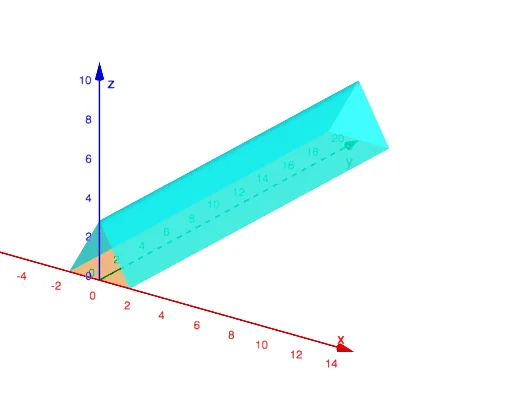
This example demonstrates how to create a Toblerone shape using an absolute value function in 3D space. The core math concepts involved include surface, translation, differential calculus, vectors 3D, algebra, and scalene triangles. Key construction points involve using GeoGebra commands/objects f and a to define functions and parameters, achieving the shape through transformations and geometric operations. Suitable for high school and above students to learn and understand function graphs, solid geometry, and applications of calculus.
GeoGebra Commands & Parameters
f(x, y) = If[-1.75 ≤ x ≤ 1.75 ∧ 0 ≤ y ≤ 21, (0 * x) + (0 * y)]a(x, y) = If[abs(x) ≤ 1.75 ∧ 0 ≤ y ≤ 21, ((-sqrt(3)) * abs(x)) + (1.75 * sqrt(3))]
AI Drawing Prompt Reference
Draw a Toblerone shape, starting with a triangular base on the plane with the apex on the y-axis, base length 3.5, and height 21. Then, translate this plane figure 21 units upwards along the y-axis to form a 3D shape. Use an absolute value function to define the boundaries of the triangle for precision.
The prompt above was compiled from the original drawing commands and is for reference only.