
Creating a Cube by Stacking Three Pyramids
Loading the math board and drawing, please wait…
In collections
Volume of a pyramid
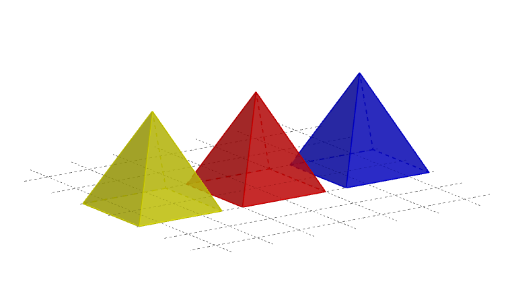
This example demonstrates how to construct a cube by stacking three pyramids. It involves core mathematical concepts such as solid geometry, volume calculation, and geometric transformations. The construction uses GeoGebra commands like Min, Max, Pyramid, Line, Rotate, Segment, and Plane. Suitable for high school geometry education, helping students understand the construction and volume relationships of polyhedra.
GeoGebra Commands & Parameters
Min((Max[t - 4, 0] * 2), 2) → b_3Min((Max[t - 3, 0] * 2), 2) → b_2Max(0, Min[t - 1, 1]) → b_1Pyramid(A_1, A_2, A_3, A_4, A_5) → a, Fläche5, Kante3, Kante5, Kante7, Kante8, Fläche1, Fläche3, Fläche4, Fläche2, Kante1, Kante4, Kante6, Kante2Pyramid(B_1, B_2, B_3, B_4, B_5) → c_1, Fläche6, Kante13, Kante14, Kante15, Kante16, Fläche7, Fläche8, Fläche9, Fläche10, Kante9, Kante10, Kante11, Kante12Pyramid(C_1, C_4, C_5, C_6, C_3) → e, Fläche11, Kante21, Kante22, Kante23, Kante24, Fläche12, Fläche13, Fläche14, Fläche15, Kante17, Kante18, Kante19, Kante20Min((Max[t - 2, 0] * π / 2), 1.5707963267948966) → dw_3Line(D, D_1) → s_xRotate(e, (-dw_3), s_x) → e'Segment(A_5, Fp_1) → lot_1Segment(B_5, Fp_2) → lot_2Segment(Fp_3, Fp_3 + (0, 0, 4)) → lot_3Line((2, 0, 0), (2, 1, 0)) → s_{xy1}Line((-2, 0, 0), (-2, 1, 0)) → s_{xy2}Plane((0, 0, 4), (1, 0, 4), (1, 1, 4)) → c
AI Drawing Prompt Reference
Draw a cube constructed by stacking three pyramids, illustrating core geometric concepts. First, create three pyramids with square bases of decreasing sizes, then stack them sequentially using rotation and translation to form a cube. The pyramids' apexes meet at the center of the cube's top face, while their bases form the bottom face of the cube. The structure should clearly display the geometric relationships and volume relationships between the pyramids and the cube.
The prompt above was compiled from the original drawing commands and is for reference only.