
Create a Cylinder with Given Lateral Area
Loading the math board and drawing, please wait…
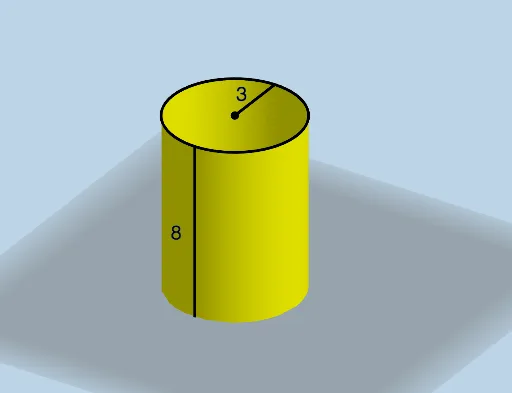
This example demonstrates how to draw a cylinder given its lateral area. Key mathematical concepts include the calculation of the lateral area of a cylinder and geometric construction. Using GeoGebra commands such as Surface, Segment, and Circle, the geometric shape of the cylinder can be constructed. Suitable for students at the middle school level and above for learning solid geometry.
GeoGebra Commands & Parameters
Surface((r * cos(u)), (r * sin(u)), v, u, 0, (2 * π), v, 0, h) → aSegment(A, B) → fCircle(A, B, p) → cTranslate(c, Vector[(0, 0, (-h))]) → c'Segment(C, B) → gMirror(B, A) → B'Mirror(D, B') → D'Dilate(B', If[0 < b ≤ 1, 1 - b, 0], D) → B''Mirror(B'', B') → B'''Segment(B', B'') → iSegment(B', B''') → jTranslate(A, Vector[B', B'']) → A'Translate(B, Vector[B', B'']) → B'_1Rotate(B'_1, If[0 < b ≤ 1, (b * π), π], A') → ECircleArc(A', B'', E) → dPlane(B, A, (0, 0, 0)) → qMirror(d, q) → d'Mirror(E, q) → E'Angle(E, A', B'') → αTranslate(B'', Vector[(0, 0, (-h))]) → B'''_1Line(A', A' + (0, 0, 1)) → lTranslate(E, Vector[(0, 0, (-h))]) → E'_1Segment(E, E'_1) → kSurface(k, α, l) → eMirror(e, q) → e'Translate(B''', Vector[(0, 0, (-h))]) → FMirror(E, q) → E'_2Mirror(E'_1, q) → GSegment(E'_2, G) → k'Polygon(B''', F, B'''_1, B'') → q1, b''', f_1, b'''_1, b''Segment(A, B') → mMode(l1) → l2RandomElement(l1) → nCountIf(x ≟ n, l1) → o