
Cosine Spindle Surface: Constructing “Spindelfläche” with Parameters
Loading the math board and drawing, please wait…
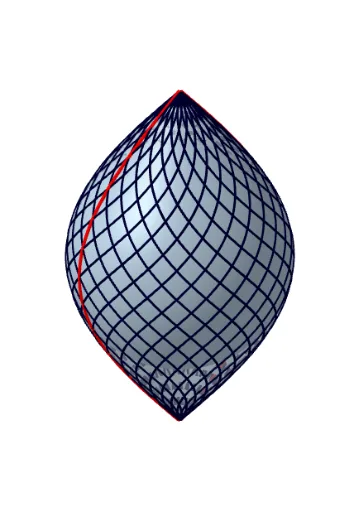
This example demonstrates how to visualize a cosine-driven spindle surface (Cos-Spindelfläche) and the way its 3D shape varies through parameter choices. The key mathematics includes parametric surface construction, trigonometric functions (especially cosine), continuity and geometric smoothness, and using spherical/circular parameterizations to create a twisted “spindle” structure. Construction highlights: GeoGebra uses Surface to generate the 3D surface, Sequence to iterate parameter values for sampling/animation, and CurveCartesian to define the Cartesian curve data that supports the surface’s shape. The construction involves objects such as Kugel (a spherical reference), Spindel (the main twisted surface), and parameter controls (a, b, n, S1, S2, c, d, e) together with profile elements (profil1, profil2) and buttons (Schaltfläche1, Schaltfläche2) for switching/updating the build. Suitable for high school through early university-level instruction and for interactive exploration of parametric equations and trigonometry in 3D graphing.
GeoGebra Commands & Parameters
Surface((cos(u) * cos(v)), (cos(u) * sin(v)), sin(u), u, ((-π)) / 2, π / 2, v, 0, (2 * π)) → KugelSurface((cos(u) * cos(v)), (cos(u) * sin(v)), u, u, ((-π)) / 2, π / 2, v, 0, (2 * π)) → SpindelSequence(CurveCartesian[(cos(t) * cos(t + ((2 * k) * π / n))), (cos(t) * sin(t + ((2 * k) * π / n))), t, t, ((-π)) / 2, π / 2], k, 1, n) → S1Sequence(CurveCartesian[(cos(t) * sin(t + ((2 * k) * π / n))), (cos(t) * cos(t + ((2 * k) * π / n))), t, t, ((-π)) / 2, π / 2], k, 1, n) → S2CurveCartesian(cos(t), 0, t, t, ((-π)) / 2, π / 2) → profil1CurveCartesian((-cos(t)), 0, t, t, ((-π)) / 2, π / 2) → profil2
AI Drawing Prompt Reference
Visualize a cosine-driven spindle surface to show how its 3D shape varies with parameter choices. Focus on constructing a parametric surface using cosine and trigonometric functions, highlighting continuity and geometric smoothness. Include a spherical reference and a main twisted surface to demonstrate the 'spindle' structure. Use sequences to iterate parameter values for sampling and define Cartesian curves supporting the surface's shape. Add two profile elements and buttons for switching and updating the construction.
The prompt above was compiled from the original drawing commands and is for reference only.