
Cosine Law
Loading the math board and drawing, please wait…
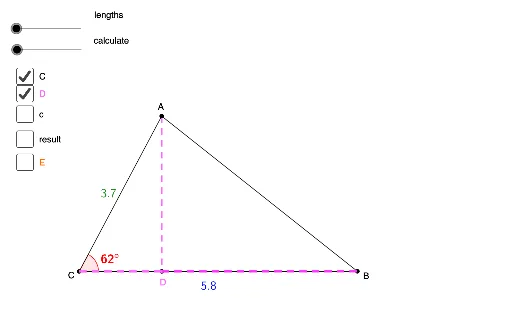
This example illustrates the Cosine Law, which states that the square of any side of a triangle is equal to the sum of the squares of the other two sides minus twice their product with the cosine of the included angle. Key concepts include trigonometry and geometric construction. Using GeoGebra commands such as Segment, OrthogonalLine, Line, and Intersect, the example dynamically demonstrates the application of the Cosine Law. Suitable for high school mathematics education.
GeoGebra Commands & Parameters
Segment(A, C) → bSegment(C, B) → aSegment(B, A) → cOrthogonalLine(A, a) → dLine(C, B) → eIntersect(d, e) → DSegment(C, D) → fSegment(A, D) → gAngle(B, C, A) → αMidpoint(b) → E_1Midpoint(a) → FMidpoint(g) → GMidpoint(f) → HMidpoint(D, B) → ISegment(D, B) → jMidpoint(A, B) → JOrthogonalLine(B, b) → pLine(C, A) → qIntersect(p, q) → ESegment(B, E) → rSegment(A, E) → sSegment(E, C) → t
AI Drawing Prompt Reference
Draw a triangle ABC with side AB as c, BC as a, and CA as b. Construct a perpendicular line from point A to side BC, intersecting at point D. Connect CD and AD to get sides f and g. Measure angle BAC to get angle α. Construct a perpendicular line at the midpoint of side b, intersecting the perpendicular from AC at point E, and connect BE and AE to get sides r and s.
The prompt above was compiled from the original drawing commands and is for reference only.