
Cosine and Sine Addition Formulae
Loading the math board and drawing, please wait…
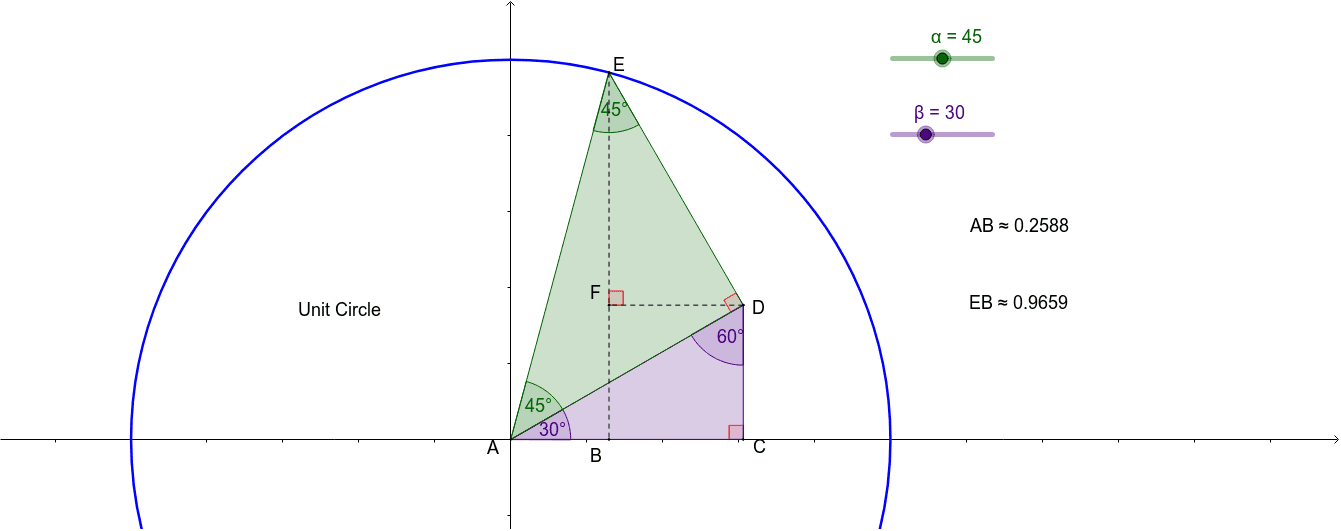
This example illustrates the cosine and sine addition formulas. Key mathematical concepts include the trigonometric addition formulas. Using commands like Intersect, Point, Circle, Rotate, Line, OrthogonalLine, Polygon, Angle, Distance, and Segment, it demonstrates the geometric meaning of the addition formulas. Suitable for high school mathematics education and learning.
GeoGebra Commands & Parameters
Intersect(xAxis, yAxis) → APoint(yAxis) → B_1Circle(A, B_1) → cPoint(c) → C_1Rotate(C_1, (α + β)°, A) → ERotate(C_1, β°, A) → C'_1Line(A, C'_1) → fLine(A, C_1) → gLine(A, E) → hOrthogonalLine(E, f) → iIntersect(f, i) → DOrthogonalLine(D, g) → jIntersect(g, j) → CPolygon(A, C, D) → poly1, d, a, ePolygon(A, D, E) → poly2, c', a_1, d_1Angle(poly2) → γ, δ, εAngle(poly1) → ζ, η, θOrthogonalLine(E, g) → kOrthogonalLine(D, yAxis) → lIntersect(h, l) → GIntersect(g, k) → BIntersect(k, l) → FDistance(A, B) → distanceABSegment(E, B) → nSegment(D, F) → mDistance(E, B) → distanceEBAngle(D, F, E) → ι
AI Drawing Prompt Reference
Draw a coordinate plane with a unit circle centered at the origin. Place a point on the positive y-axis, then rotate this point around the center by two given angles to obtain two new points, and also rotate it by the sum of the two angles to get a third point. Draw three rays from the center through these points. From the third point, draw a perpendicular to the first ray, intersecting it at a point; from that intersection, draw a perpendicular to the second ray, intersecting it at another point. This forms two adjacent right triangles sharing a side. Add additional perpendiculars to construct a rectangle and auxiliary points, then label the interior angles and side lengths of the triangles to illustrate the geometric meaning of the cosine and sine addition formulas.
The prompt above was compiled from the original drawing commands and is for reference only.