
Cosine Addition Formula via Cosine Law
Loading the math board and drawing, please wait…
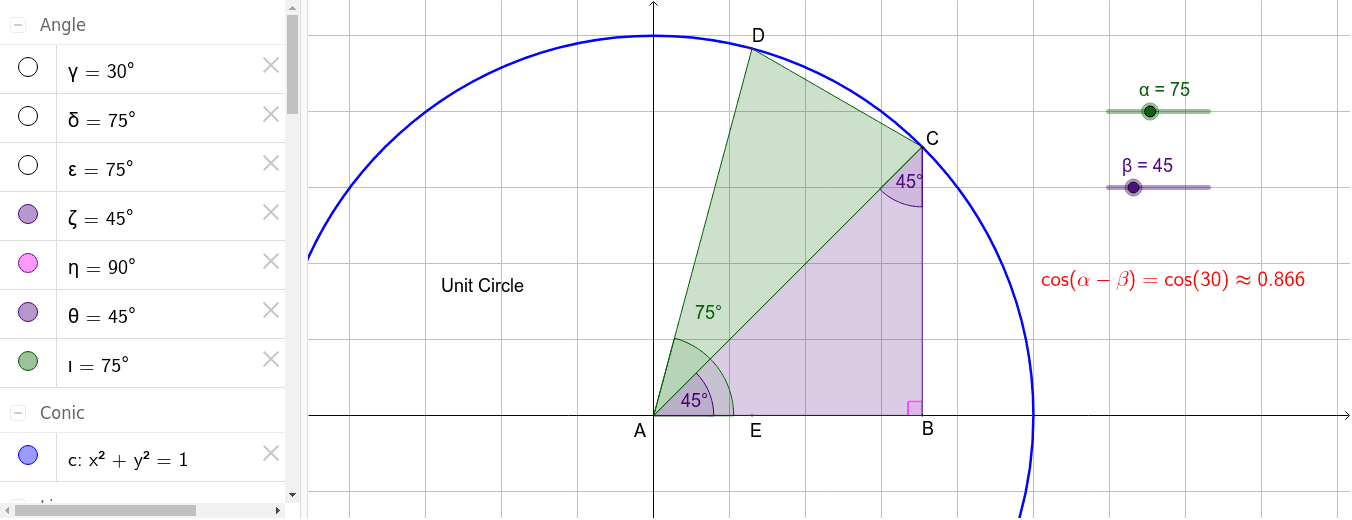
This example demonstrates the cosine addition formula using the cosine law. It involves core mathematical concepts such as trigonometry. Using GeoGebra commands like Point, Intersect, Circle, Rotate, etc., a geometric figure is constructed to visually illustrate the cosine addition formula. Suitable for high school mathematics education and learning.
GeoGebra Commands & Parameters
Point(yAxis) → B_1Intersect(xAxis, yAxis) → ACircle(A, B_1) → cPoint(c) → C_1Rotate(C_1, β°, A) → C'_1Line(A, C'_1) → fIntersect(c, f, 2) → CLine(A, C_1) → gOrthogonalLine(C, g) → pIntersect(g, p) → BRotate(C_1, α°, A) → DPolygon(A, B, C) → poly1, q, r, sLine(A, D) → hPolygon(A, C, D) → poly2, t, a, bAngle(poly2) → γ, δ, εAngle(poly1) → ζ, η, θOrthogonalLine(D, g) → kDistance(C, D) → distanceCDAngle(B, A, D) → ιIntersect(k, q) → EDistance(A, E) → distanceAE
AI Drawing Prompt Reference
Draw a right-angled coordinate system. Take a point on the x-axis, draw a circle centered at this point intersecting the y-axis at a point. Rotate this point around the origin by angle α to get a new point. Connect the origin to this point. Draw a line through the intersection of the circle and the previous line, intersecting the x-axis at another point. Connect the origin to this intersection point. Draw a perpendicular line from the intersection point to the previous line, meeting it at a point. Form two triangles using the origin, intersection points, and the rotated point. Label the interior angles of the triangles and calculate the distance between two specific points.
The prompt above was compiled from the original drawing commands and is for reference only.