
Copying a Line Segment (Compass-Straightedge Construction)
Loading the math board and drawing, please wait…
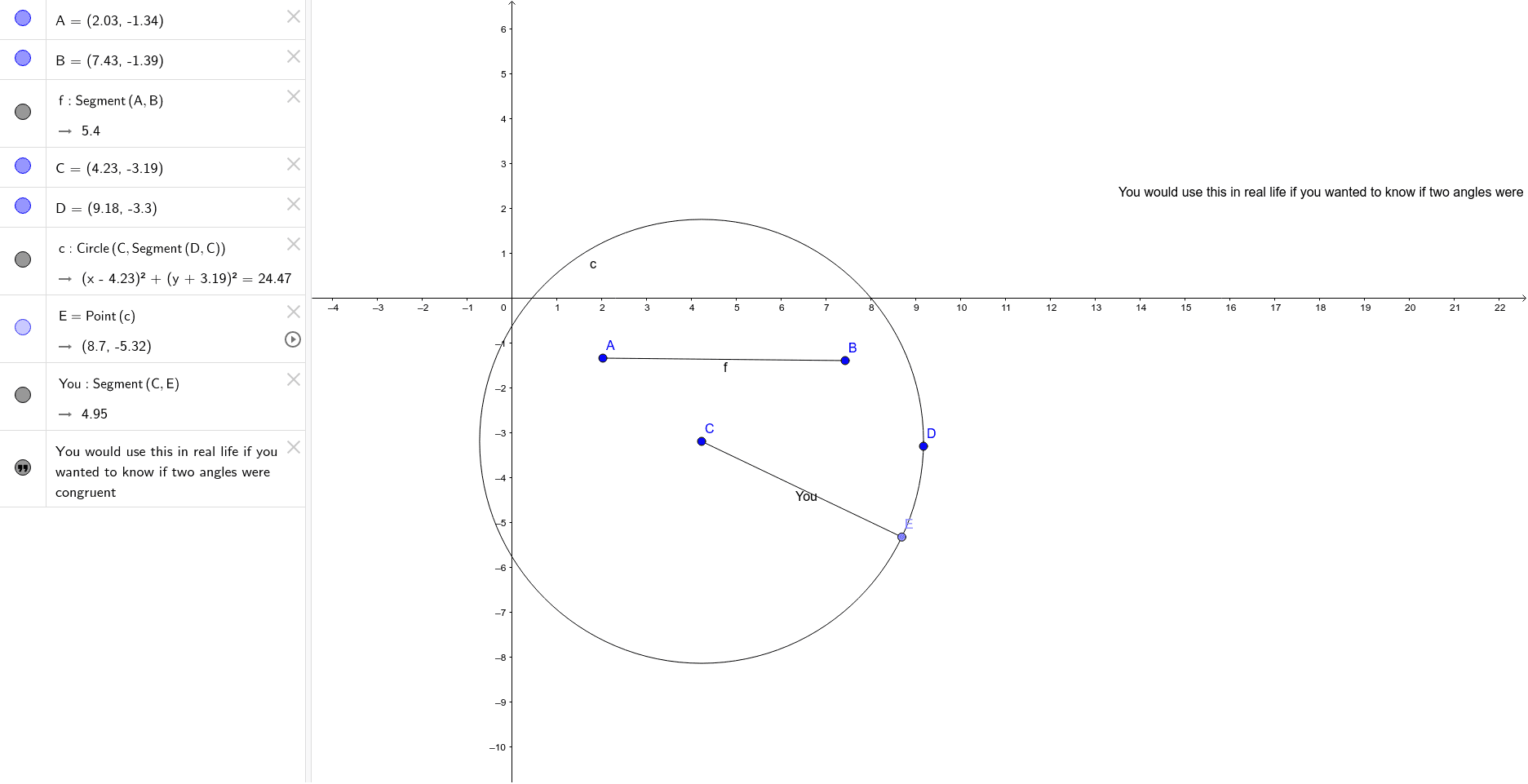
This example demonstrates how to copy a given line segment to a new location using fundamental compass-and-straightedge operations. The core mathematical concept is the basic axiom of geometric construction—determining equal lengths through intersections of circles and lines, illustrating the invariance of segment length under translation. Construction steps: use the Segment command to create the original segment AB, draw a circle centered at point C with radius equal to AB (Circle command), find the intersection point D of the circle with the target line, and finally connect C and D using the Segment command to obtain the copied segment. This example is suitable for middle school geometry introduction, helping students understand the logic and steps of compass-and-straightedge construction, and can also be used for dynamic demonstrations of translation properties in geometric transformations.
GeoGebra Commands & Parameters
Segment(A, B) → fCircle(C, Segment[D, C]) → cPoint(c) → ESegment(C, E) → You
AI Drawing Prompt Reference
Draw a line segment AB, then draw a circle with center C and radius equal to AB. Find the intersection point D of the circle with the target line, and finally draw a line segment from C to D.
The prompt above was compiled from the original drawing commands and is for reference only.