
Continuous Construction of Isosceles Triangles and Geometric Relations
Loading the math board and drawing, please wait…
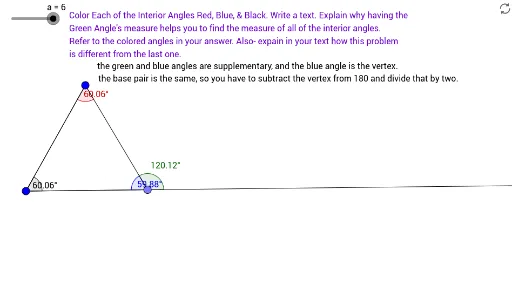
This GeoGebra example demonstrates the sequential construction of multiple isosceles triangles, exploring dynamic geometric relationships among vertices, sides, and angles. Core mathematical concepts include properties of isosceles triangles, triangle angle sum, symmetry, and quantitative analysis via linear programming or statistical characteristics. Construction highlights: using commands such as Polygon, Point, Segment, Line, Angle, Midpoint, Ray, OrthogonalLine, and Mirror, the applet creates several triangles (poly1, poly2, poly3) with auxiliary lines, a button (button1) to control dynamic changes, and text objects (text1-text4) displaying measured angles (α, β, γ, δ). Suitable for middle and high school geometry classes, this example is ideal for investigating continuous isosceles triangle construction, symmetry transformations, and angle relationships, as well as for interactive math demonstrations.
GeoGebra Commands & Parameters
Polygon(C, A, B) → poly1, b, c, a_1Point(Circle[D, 8]) → ESegment(D, E) → fPoint(Circle[D, 8]) → FSegment(D, F) → gPoint(Circle[F, 8]) → GSegment(F, G) → hLine(D, E) → iPolygon(D, F, G) → poly2, g_1, d, f_1Polygon(D, F, E) → poly3, e, d_1, f_2Segment(D, E) → jAngle(D, E, F) → αAngle(E, F, D) → βAngle(E, G, F) → γAngle(F, D, E) → δMidpoint(H, I) → JRay(H, J) → kOrthogonalLine(J, k) → lPoint(l) → KSegment(K, H) → mSegment(K, I) → nPoint(k) → LAngle(L, I, K) → εMirror(M, N) → M'Segment(M, M') → pOrthogonalLine(N, p) → qPoint(q) → OSegment(M, O) → rSegment(M', O) → sSegment(M', M) → tRay(M, O) → h_1Point(h_1) → PAngle(P, O, M') → ζAngle(K, I, H) → ηAngle(I, H, K) → θAngle(H, K, I) → ιAngle(M, M', O) → κAngle(M', O, M) → λAngle(O, M, M') → μ
AI Drawing Prompt Reference
Draw multiple isosceles triangles to illustrate the dynamic geometric relationships among vertices, sides, and angles. Start by constructing an isosceles triangle, then add auxiliary lines and create two new isosceles triangles based on it. Include a button to control dynamic changes and label the measured angles. The figure should highlight symmetry transformations, angle relationships, and auxiliary lines, suitable for exploring continuous isosceles triangle construction and geometric properties.
The prompt above was compiled from the original drawing commands and is for reference only.