
Construction of the Intersection Point of Three Circles IV
Loading the math board and drawing, please wait…
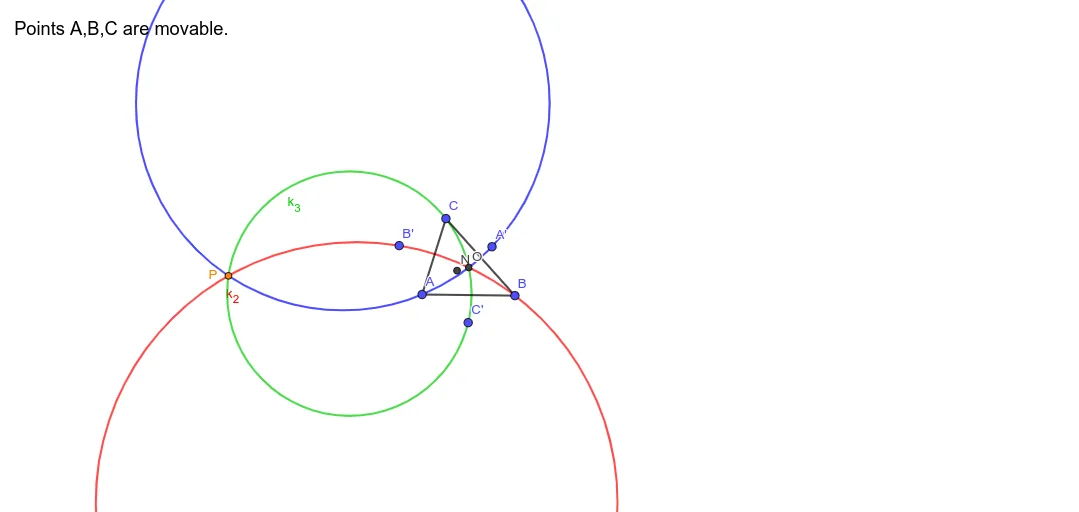
This example demonstrates how to construct the (corresponding) intersection point determined by three circles in a GeoGebra setup, using auxiliary geometry and symmetry. The key mathematical ideas are circle-circle intersections, triangle geometry centers (via TriangleCenter), and the use of geometric transformations—especially reflection (Mirror)—to create tractable relationships. A position is then fixed by computing intersections (Intersect) and checking/using distance constraints (Distance). Construction highlights from the provided commands and objects include: Polygon and TriangleCenter to build a reference triangle and its center; Mirror to generate reflected points (A', B', C'); Circle to create the three circles; Intersect to obtain intersection points; and Distance together with points/parameters such as A, B, C, O, k_1, k_2, k_3 and the resulting point P (plus line g) to finalize the configuration. Suitable for middle/high school geometry practice, competition-style geometry learning, and GeoGebra-based modeling lessons focused on circles and symmetry.
GeoGebra Commands & Parameters
Polygon(A, B, C) → t1, c, a, bTriangleCenter(A, B, C, 5) → NMirror(A, N) → A'Mirror(B, N) → B'Mirror(C, N) → C'TriangleCenter(A, B, C, 3) → OCircle(O, A, A') → k_1Circle(O, B', B) → k_2Circle(O, C, C') → k_3Intersect(k_1, k_2, 2) → PDistance(P, k_3) → g
AI Drawing Prompt Reference
Create a planar construction starting from three noncollinear given points forming a reference triangle. Determine a triangle center point of this triangle, then reflect each vertex across that center to obtain three corresponding mirrored points. With the center point as the common reference, construct three circles: each circle is defined so it passes through one original vertex and its corresponding mirrored point, using the respective radius from the center. Find intersection points of the first two circles and choose the intersection point (one of the two) as the target point. Finally, apply a distance constraint involving the target point and the third circle to finalize the configuration, keeping the distance-related reference element that represents this constraint.
The prompt above was compiled from the original drawing commands and is for reference only.