
Constructing Three Equilateral Triangles in One Diagram
Loading the math board and drawing, please wait…
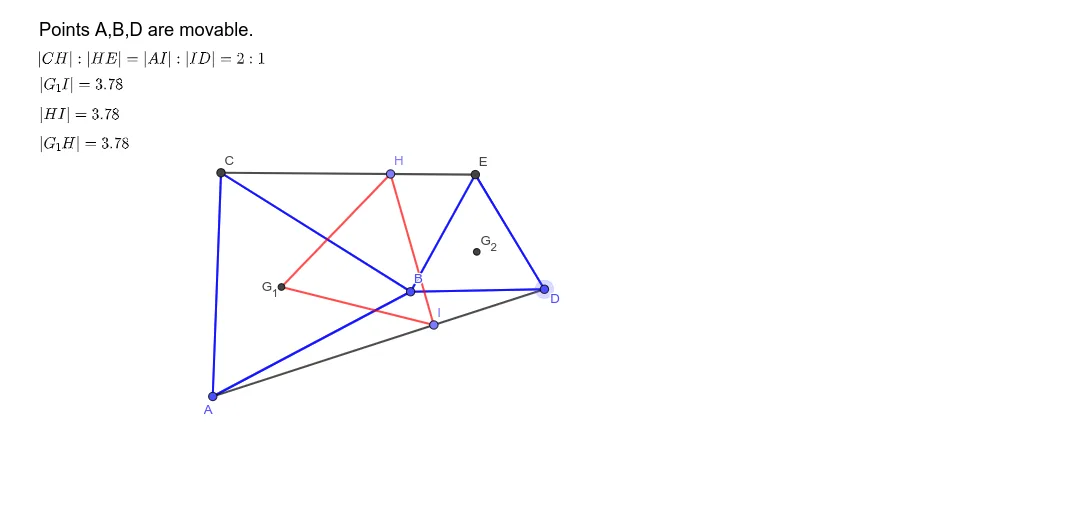
This example demonstrates how to construct three equilateral triangles in a single plane and visualize their relative placement using dynamic geometric construction. It centers on core geometry ideas such as equilateral triangle properties, defining key points geometrically, and using triangle centers to capture important structural features. In GeoGebra, the construction is built with Polygon to create the triangle boundaries, Segment to form the edges and auxiliary supporting lines, and TriangleCenter to compute and place characteristic points derived from each equilateral triangle. The workflow uses multiple geometric objects (points like A, B, C, D, E, and polygon objects such as poly1 and poly2) to assemble the three triangles consistently, while text objects (text1–text5) support labeling and interpretation. Suitable for secondary-school geometry instruction, geometry visualization practice, and early contest training where students benefit from seeing how equilateral triangles can be constructed and organized systematically.
GeoGebra Commands & Parameters
Polygon(A, B, 3) → poly1, f, g, h, CPolygon(B, D, 3) → poly2, i, j, k, ESegment(C, E) → lSegment(A, D) → mTriangleCenter(A, B, C, 2) → G_1TriangleCenter(D, E, B, 2) → G_2Segment(H, G_2) → qSegment(G_2, I) → rPolygon(G_1, I, H) → t1, h_1, f_1, i_1
AI Drawing Prompt Reference
Draw three equilateral triangles with vertices at points A, B, and D respectively, connect their sides and form auxiliary segments. Use triangle centers to calculate and place key points G1 and G2, then connect these points to form a new triangle.
The prompt above was compiled from the original drawing commands and is for reference only.