
Constructing Similar Triangles with Angle/Length Evidence (GeoGebra)
Loading the math board and drawing, please wait…
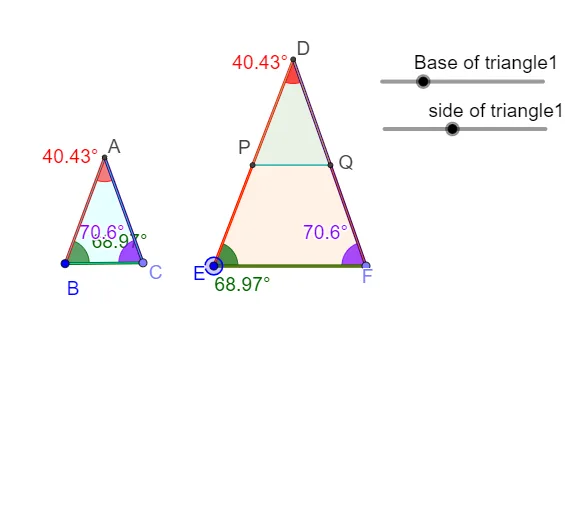
This GeoGebra example demonstrates how to build configurations of triangles and verify similar-triangle conclusions using corresponding angles and proportional side lengths. It focuses on the core ideas of similarity (equal corresponding angles and proportional corresponding sides) together with practical measurement of angles and segment lengths as evidence. Construction highlights: Point creates key vertices (e.g., A, B, C and auxiliary points); Circle and Intersect generate additional intersection points that drive the configuration; Segment draws triangle sides; Angle measures and labels critical angles (such as α, β, γ); Rotate and/or Ray helps position rays or rotated elements to create matching angle structures; Polygon organizes the triangle geometry; Distance computes side lengths; and Text annotates computed lengths like distanceAB and distanceBC alongside named variables (e.g., side lengths). The provided objects/parameters (e.g., side1length/side2length/side3length and multiple angle/ratio-related labels) reflect a construction-first workflow: geometry is built, then similarity is confirmed via measured angle equality and side ratios. Suitable for secondary-school geometry instruction, contest prep, and dynamic-geometry lessons that emphasize reasoning from constructed evidence.
GeoGebra Commands & Parameters
Point(Circle[B, side1length]) → CCircle(B, side2length) → cCircle(C, side3length) → dIntersect(c, d, 1) → ASegment(B, A) → bSegment(C, A) → aSegment(B, C) → e_1Angle(C, B, A) → αPoint(Circle[E, triangle2side2length]) → FSegment(E, F) → fRotate(F, α, E) → YAngle(F, E, Y) → βRay(E, Y) → gAngle(A, C, B) → γRotate(E, (-γ), F) → XAngle(X, F, E) → δRay(F, X) → hIntersect(g, h) → DCircle(D, b) → kCircle(D, a) → pCircle(D, a) → qIntersect(q, h, 1) → QCircle(D, b) → rIntersect(r, g, 1) → PSegment(P, Q) → iSegment(E, D) → lSegment(D, F) → mAngle(B, A, C) → εSegment(P, Q) → eDistance(A, B) → distanceABDistance(B, C) → distanceBCDistance(A, C) → distanceACDistance(D, E) → distanceDEDistance(E, F) → distanceEFDistance(D, F) → distanceDFPolygon(B, C, A) → t1, a_1, b_1, c_1Polygon(P, Q, D) → t2, d_1, p_1, q_1Polygon(E, F, D) → t3, d_2, e_2, f_1Angle(E, D, F) → ζ
AI Drawing Prompt Reference
Draw two similar triangles, verifying their similarity through equal corresponding angles and proportional corresponding sides. First, use circles and intersections to determine key vertices, then draw the triangle sides. Measure and label critical angles like α, β, γ, and use rotation and rays to create matching angle structures. Measure and label side lengths, finally using a polygon tool to organize the geometry, showing the construction process of similar triangles.
The prompt above was compiled from the original drawing commands and is for reference only.