
Constructing Parallelograms
Loading the math board and drawing, please wait…
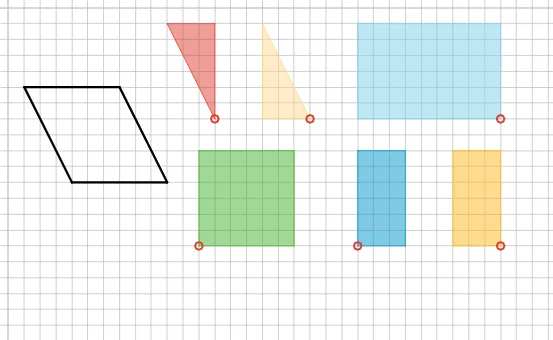
This example demonstrates the construction of parallelograms using geometric principles such as parallel lines, vectors, and polygons. GeoGebra commands like Point, Line, Segment, Vector, and Polygon are used to create the parallelogram. Suitable for middle school geometry lessons.
GeoGebra Commands & Parameters
Point(xAxis) → APoint(xAxis) → BLine(C, xAxis) → aSegment(A, B) → bSegment(A, C) → cLine(B, c) → dIntersect(a, d) → DSegment(C, D) → eSegment(D, B) → fOrthogonalLine(A, b) → gIntersect(a, g) → E_2Vector(A, A_1) → uPolygon(A, E_2, C) → poly1, c_1, a_1, e_1Translate(A, u) → ETranslate(E_2, u) → FTranslate(C, u) → GPolygon(E, F, G) → poly1', c', a', e'OrthogonalLine(B, a) → hIntersect(a, h) → G_1OrthogonalLine(D, a) → iIntersect(i, xAxis) → I_1Polygon(D, B, I_1) → poly2, i_1, d_1, b_1Vector(B, B_1) → vTranslate(D, v) → HTranslate(B, v) → ITranslate(I_1, v) → JPolygon(H, I, J) → poly2', i', d', b'Intersect(a, g) → J_1OrthogonalLine(C, j) → kIntersect(j, k) → K_1Polygon(E_2, C, K_1, A) → poly3, e_2, c_2, k_1, a_2Vector(A, D_1) → lTranslate(E_2, l) → WTranslate(C, l) → XTranslate(K_1, l) → YTranslate(A, l) → ZPolygon(W, X, Y, Z) → poly3', e'_1, c'_2, k', a'_2Polygon(K_1, I_1, D, C) → poly4, k_2, i_2, d_2, c_3Vector(K_1, E_1) → wTranslate(K_1, w) → OTranslate(I_1, w) → PTranslate(D, w) → QTranslate(C, w) → RPolygon(O, P, Q, R) → poly4', k'_1, i'_1, d'_1, c'_1Polygon(A, J_1, D, I_1) → poly5, a_3, j_1, d_3, i_3Vector(A, F_1) → mTranslate(A, m) → STranslate(J_1, m) → TTranslate(D, m) → UTranslate(I_1, m) → VPolygon(S, T, U, V) → poly5', a'_1, j', d'_2, i'_2Polygon(C, K_1, B, G_1) → poly6, c_4, k_3, b_2, g_1Vector(B, C_1) → nTranslate(C, n) → KTranslate(K_1, n) → LTranslate(B, n) → MTranslate(G_1, n) → NPolygon(K, L, M, N) → poly6', c'_3, k'_2, b'_1, g'Polygon(A, B, D, C) → poly7, a_4, b_3, d_4, c_5
AI Drawing Prompt Reference
Start with two points on the x-axis as the base, and a third point off the axis as the top vertex. Connect the base points to the vertex to form a triangle. Draw a line through the vertex parallel to the base, and another line through one base point parallel to the side connecting the vertex to the other base point. Their intersection gives the fourth point, completing a parallelogram. Then, from the base, drop perpendiculars from the vertex and the opposite point to the x-axis, forming right triangles. Translate these shapes along given vectors to create congruent copies, arranging them into a composite figure of multiple parallelograms and triangles.
The prompt above was compiled from the original drawing commands and is for reference only.