
Constructing and Verifying Congruent Line Segments
Loading the math board and drawing, please wait…
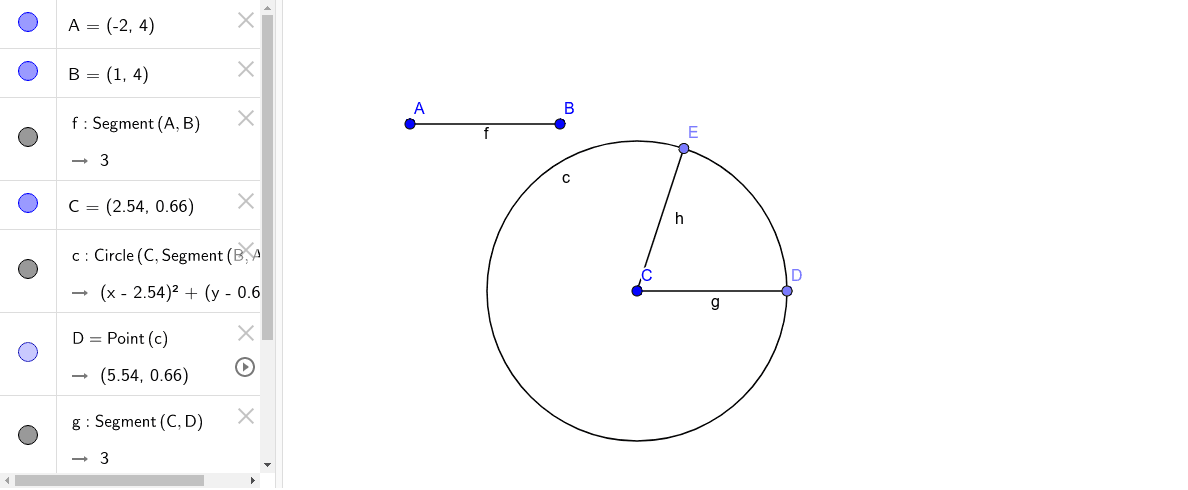
This GeoGebra example demonstrates how to construct and verify congruent line segments (segments of equal length) in a dynamic geometry environment. The core mathematical concept is segment congruence, achieved through compass-style construction: drawing a circle with a given radius to replicate a length. The construction uses the Segment command to create segment AB, the Circle command to draw a circle centered at A with radius equal to AB, and the Point command to select points (C, D, E) on the circle. Connecting these points to A (or to each other) with the Segment command produces segments that are visibly equal in length to AB, confirming congruence. This example is ideal for middle school geometry lessons, helping students grasp the definition of congruent segments, the principle of compass construction, and the use of GeoGebra's measurement and construction tools.
GeoGebra Commands & Parameters
Segment(A, B) → fCircle(C, Segment[B, A]) → cPoint(c) → DSegment(C, D) → gPoint(c) → ESegment(C, E) → h