
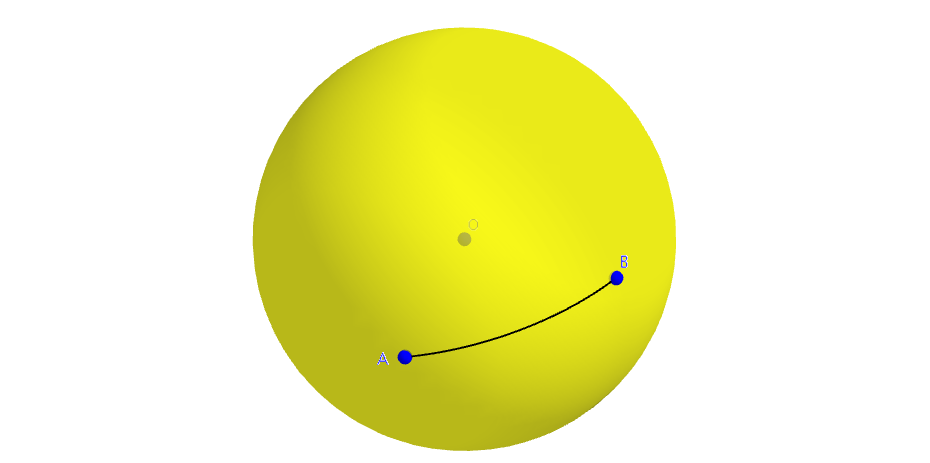
Constructing a Spherical Segment
Loading the math board and drawing, please wait…
In collections
Spherical Geometry Ideas
This example demonstrates how to construct a spherical segment using GeoGebra commands. Key mathematical concepts include spherical geometry, parametric equations, and 3D curve plotting. Construction highlights involve using commands like Sphere, PointIn, Plane, IntersectPath, OrthogonalLine, Intersect, Angle, and CurveCartesian to create the shape. Suitable for high school and above students to learn about applications of solid geometry and parametric equations.
GeoGebra Commands & Parameters
Sphere(O, 1) → aPointIn(a) → APointIn(a) → BPlane(O, A, B) → bIntersectPath(b, a) → cOrthogonalLine(O, c) → dPlane(A, d) → eOrthogonalLine(O, e) → fIntersect(f, a, 2) → CAngle(A, O, C) → αCurveCartesian((x(A) * cos(t)) + (x(C) * sin(t)), (y(A) * cos(t)) + (y(C) * sin(t)), (z(A) * cos(t)) + (z(C) * sin(t)), t, 0, Angle[A, O, B]) → g
AI Drawing Prompt Reference
Construct a spherical segment by first creating a unit sphere, then selecting two points A and B on the sphere to define a plane b that intersects the sphere to form curve c. Construct a line d perpendicular to c, and define a plane e through point A and containing line d. Then, construct a line f perpendicular to e, which intersects the sphere to form point C. Finally, calculate angle α and use a parametric equation to draw the spherical segment from A to C.
The prompt above was compiled from the original drawing commands and is for reference only.