
Constructing a Regular Pentagon Given a Side
Loading the math board and drawing, please wait…
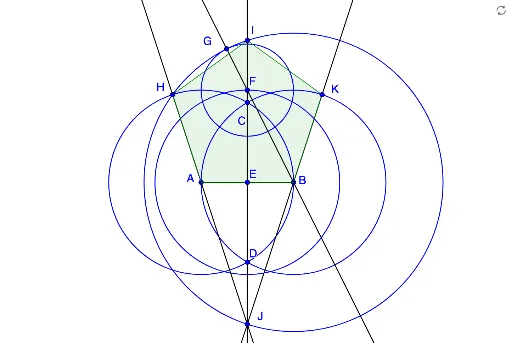
This example demonstrates how to construct a regular pentagon when the length of a side is given. Key math concepts include regular polygons, circles, intersection, lines, and geometric constructions. The construction uses commands like Segment, Circle, Intersect, Line, and Polygon to create the shape. Suitable for middle school students and above for learning geometric construction techniques and exploring geometry.
GeoGebra Commands & Parameters
Segment(A, B) → aCircle(B, A) → cCircle(A, B) → dIntersect(c, d, 2) → CIntersect(c, d, 1) → DLine(C, D) → bIntersect(b, a) → ECircle(E, Radius[d]) → fIntersect(f, b, 1) → FCircle(F, Segment[E, B]) → eLine(B, F) → gIntersect(e, g, 2) → GCircle(B, G) → hIntersect(d, h, 1) → HIntersect(h, b, 1) → ILine(H, A) → iIntersect(h, b, 2) → JLine(J, B) → jIntersect(c, j, 2) → KSegment(I, H) → qSegment(I, K) → rPolygon(I, H, A, B, K) → poly1, k, l, m, n, p
AI Drawing Prompt Reference
Construct a regular pentagon with a given side length. Start by drawing side AB, then draw two circles with centers A and B and the same radius, finding their intersection points C and D. Connect CD, which intersects AB at point E. Draw a circle with center E and radius ED, intersecting CD at F. Draw a circle with center F and radius FB, intersecting EF at G. Draw a circle with center G and radius GB, intersecting BF at H. Draw a circle with center H and radius HA, intersecting BG at I. Connect HI, which intersects AB at J. Connect JB, which intersects CD at K. Connect IK, HJ, and JK to form the regular pentagon IJKHA.
The prompt above was compiled from the original drawing commands and is for reference only.