
Constructing a Regular Hexagon
Loading the math board and drawing, please wait…
In collections
学习 GeoGebra 经典应用
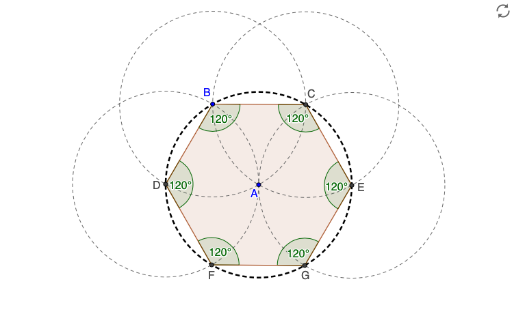
This example demonstrates how to construct a regular hexagon. It involves key mathematical concepts in geometry and geometric construction. The construction process utilizes GeoGebra's Circle, Intersect, Polygon, and Angle commands. This example is suitable for middle school or high school students learning basic geometry and geometric construction concepts.
GeoGebra Commands & Parameters
Circle(A, B) → cCircle(B, A) → dIntersect(d, c) → C, D, ,Circle(C, A) → eIntersect(c, e, 2) → ECircle(D, A) → fIntersect(c, f, 2) → FCircle(E, A) → gIntersect(c, g, 2) → GPolygon(F, G, E, C, B, D) → poly1, e_1, g_1, f_1, c_1, b, d_1Angle(poly1) → α, β, γ, δ, ε, ζ
AI Drawing Prompt Reference
Start with two given points as centers and draw two intersecting circles using the distance between these points as the radius. Take the upper intersection point as the first vertex and the lower intersection point as the second vertex. Then draw an arc centered at the first vertex with the same radius, intersecting the first circle to obtain the third vertex. Similarly, draw an arc centered at the second vertex to get the fourth vertex. Continue by drawing another arc centered at the third vertex to find the fifth vertex. Connect these six vertices in order to form a closed hexagon, and measure all its interior angles to verify they are all 120 degrees.
The prompt above was compiled from the original drawing commands and is for reference only.