
Constructing a Polygon from Circle–Line Intersections
Loading the math board and drawing, please wait…
In collections
Poorly Drawn Parallelograms 3
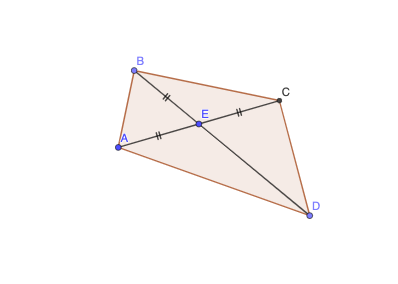
This GeoGebra example demonstrates how multiple circle and line objects can be used to generate intersection points and then connect them to form a polygonal configuration. It highlights the geometry of locating intersection points and using them as vertices to visualize relationships between different parts of the figure. The core mathematical ideas include circle–line intersection (determining key points geometrically), constructing polygons by joining points with line segments, and building structured planar geometry that can support broader discussions such as functional/equation-based relationships (e.g., linear or quadratic connections suggested by the underlying construction). Construction details: based on the provided construction summary, it uses the GeoGebra commands Circle, Line, Point, Intersect, Polygon, and Segment, and relies on objects such as E, A, B, C, D as well as circles/curves (e.g., c, f, g, q1) and auxiliary parameters (a, b, d, h, i, j, k) to define the intersection-driven vertices and edges. Suitable for secondary-level geometry lessons and self-study, especially for teaching circle properties, intersection-based construction, and visualization of math relationships through dynamic geometry.
GeoGebra Commands & Parameters
Circle(E, A) → cLine(A, E) → fPoint(c) → BLine(B, E) → gIntersect(c, f, 2) → CPoint(g) → DPolygon(D, A, B, C) → q1, a, b, c_1, dSegment(A, E) → hSegment(E, B) → iSegment(E, C) → jSegment(E, D) → k
AI Drawing Prompt Reference
Draw a quadrilateral formed by the intersection points of circles and lines. First, draw a circle c with points E and A as parameters, then draw a line f through points A and E. Next, mark a point B at the second intersection of circle c and line f. Draw a line g through points B and E, and mark a point C at the second intersection of circle c and line g. Then draw lines through points E and B, E and C, and E and D. Finally, connect points D, A, B, and C to form a quadrilateral.
The prompt above was compiled from the original drawing commands and is for reference only.