
Constructing a Parallelogram with GeoGebra
Loading the math board and drawing, please wait…
In collections
学习 GeoGebra 经典应用
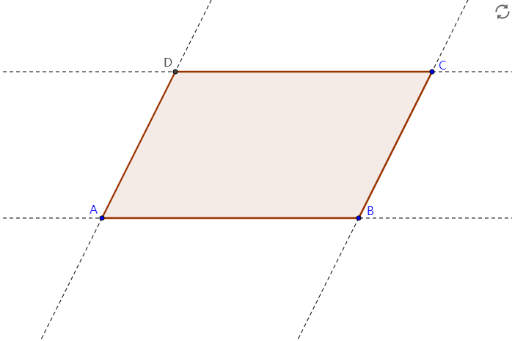
This example demonstrates how to construct a parallelogram using GeoGebra, covering core math concepts like parallel lines, diagonals, and polygon properties. Key GeoGebra commands used include Line, Intersect, and Polygon to create the shape. Suitable for middle school students and beyond for learning geometric constructions and teaching purposes.
GeoGebra Commands & Parameters
Line(A, B) → aLine(B, C) → bLine(C, a) → cLine(A, b) → dIntersect(c, d) → DPolygon(A, B, C, D) → poly1, a_1, b_1, c_1, d_1
AI Drawing Prompt Reference
Draw a parallelogram. The shape consists of four points A, B, C, and D. First, draw a line from A to B, then from B to C. Next, draw a line from C to A and find the intersection of the line from A to B and the line from B to C. Finally, connect points A, B, C, and D to form the parallelogram. Ensure that the parallelogram includes parallel lines and intersecting diagonals.
The prompt above was compiled from the original drawing commands and is for reference only.