
Constructing a Parallelogram Using Symmetries
Loading the math board and drawing, please wait…
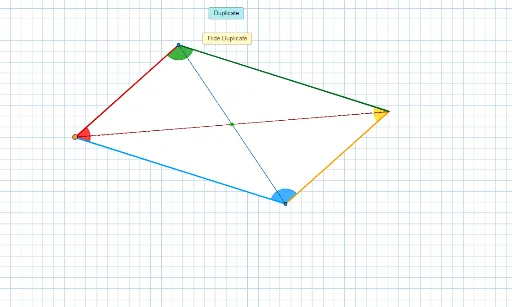
This example demonstrates how to construct a parallelogram using symmetries. It involves core mathematical concepts such as the properties of parallelograms, symmetry, rotation, complex numbers, and trigonometry. The construction uses GeoGebra commands/objects like Segment, Line, Circle, Intersect, Polygon, Point, Rotate, Angle, and UnitVector. It is suitable for high school mathematics teaching or exploration by math enthusiasts.
GeoGebra Commands & Parameters
Segment(A, B) → aLine(D, a) → bCircle(D, a) → cIntersect(c, b) → D_1, CPolygon(A, B, C, D) → poly1, a_1, b_1, c_1, dSegment(A, C) → eSegment(B, D) → fIntersect(f, e) → EPolygon(E, A, B, C, D, A, E) → poly2, e_1, a_2, b_2, c_2, d_1, a_3, e_2Point(Circle[F, e_1]) → GRotate(G + (a_2, 0), Angle[B - A] + Angle[G - F] - Angle[A - E], G) → HRotate(H + (b_2, 0), Angle[C - B] + Angle[H - G] - Angle[B - A], H) → IRotate(I + (c_2, 0), Angle[D - C] + Angle[I - H] - Angle[C - B], I) → JRotate(J + (d_1, 0), Angle[A - D] + Angle[J - I] - Angle[D - C], J) → KRotate(K + (a_3, 0), Angle[E - A] + Angle[K - J] - Angle[A - D], K) → LPolygon(F, G, H, I, J, K, L) → poly3, f_1, g, h, i, j, k, lIntersect(i, h) → MAngle(K, J, I) → εAngle(J, I, H) → ζAngle(I, H, G) → ηUnitVector(g) → uUnitVector(j) → vAngle(u, Vector[(-v)]) → θAngle(D, C, B) → βAngle(C, B, A) → γAngle(B, A, D) → δAngle(A, D, C) → αIntersect(i, h) → NSegment(G, N) → mIntersect(j, i) → OIntersect(h, g) → QSegment(O, Q) → n