
Rectangle Properties
Loading the math board and drawing, please wait…
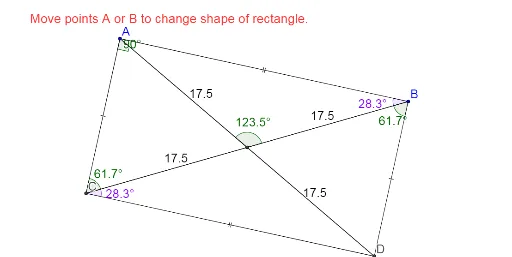
This example demonstrates the properties of a rectangle, involving linear programming, LCM and GCD, and translation. Using GeoGebra commands such as Line, OrthogonalLine, and Intersect, various elements of the rectangle can be constructed. Suitable for middle school and above students to learn geometric construction.
GeoGebra Commands & Parameters
Line(A, B) → aOrthogonalLine(B, a) → cOrthogonalLine(A, a) → dOrthogonalLine(E, d) → fIntersect(d, f) → CIntersect(f, c) → DSegment(A, B) → bSegment(B, D) → eSegment(D, C) → gSegment(C, A) → hSegment(A, D) → iSegment(B, C) → jIntersect(i, j) → FAngle(B, A, C) → αAngle(A, B, F) → βAngle(F, B, D) → γSegment(A, F) → kSegment(F, D) → lSegment(B, F) → mSegment(F, C) → nSegment(F, D) → pAngle(A, F, B) → δAngle(D, C, B) → εAngle(B, C, A) → ζ
AI Drawing Prompt Reference
Draw a rectangle and demonstrate its geometric properties. Start by drawing two adjacent sides of the rectangle, then draw perpendicular lines from these sides to find the other two vertices of the rectangle. Connect these four vertices to form the rectangle and mark the diagonals. Next, find the intersection point of the diagonals and draw perpendicular lines from this point to the four sides of the rectangle, marking the feet of the perpendiculars. Finally, measure and label some angles inside and outside the rectangle to illustrate its geometric properties.
The prompt above was compiled from the original drawing commands and is for reference only.